One of the questions we hear most from people evaluating Omni is some version of: We have a lot of data. Will Omni work for us?
Fair question! Short answer: Yes. But I figured I’d show you with a quick test on a massive dataset.
One thing worth clarifying up front: Omni always runs queries against the entire dataset in your data warehouse. Aggregations, totals, calculations, metrics – they're all computed across every row you have. Omni may limit how many rows appear in the browser to avoid slowing down the UI, but rest assured, the results come from your full dataset.
The setup #
I took a fresh Omni account (no pre-aggregation, no data extracts, cold cache) and connected it to a 3.65 billion row gaming events dataset in Snowflake. The dataset contains 39 dimensions and 49 measures.
First test: Scanning 3.65 billion rows #
I wanted to run a query that required scanning all of the rows in our table. Something to answer a question like, “Which events are happening most, broken down by platform?”
I built the query using Omni's UI, with:
Event Name and Device Platform as dimensions
Event Count as my measure
Omni generates SQL under the hood and writes it to Snowflake:
The results #
Snowflake scanned all 3,654,795,534 rows and returned results to Omni in 3.8 seconds.
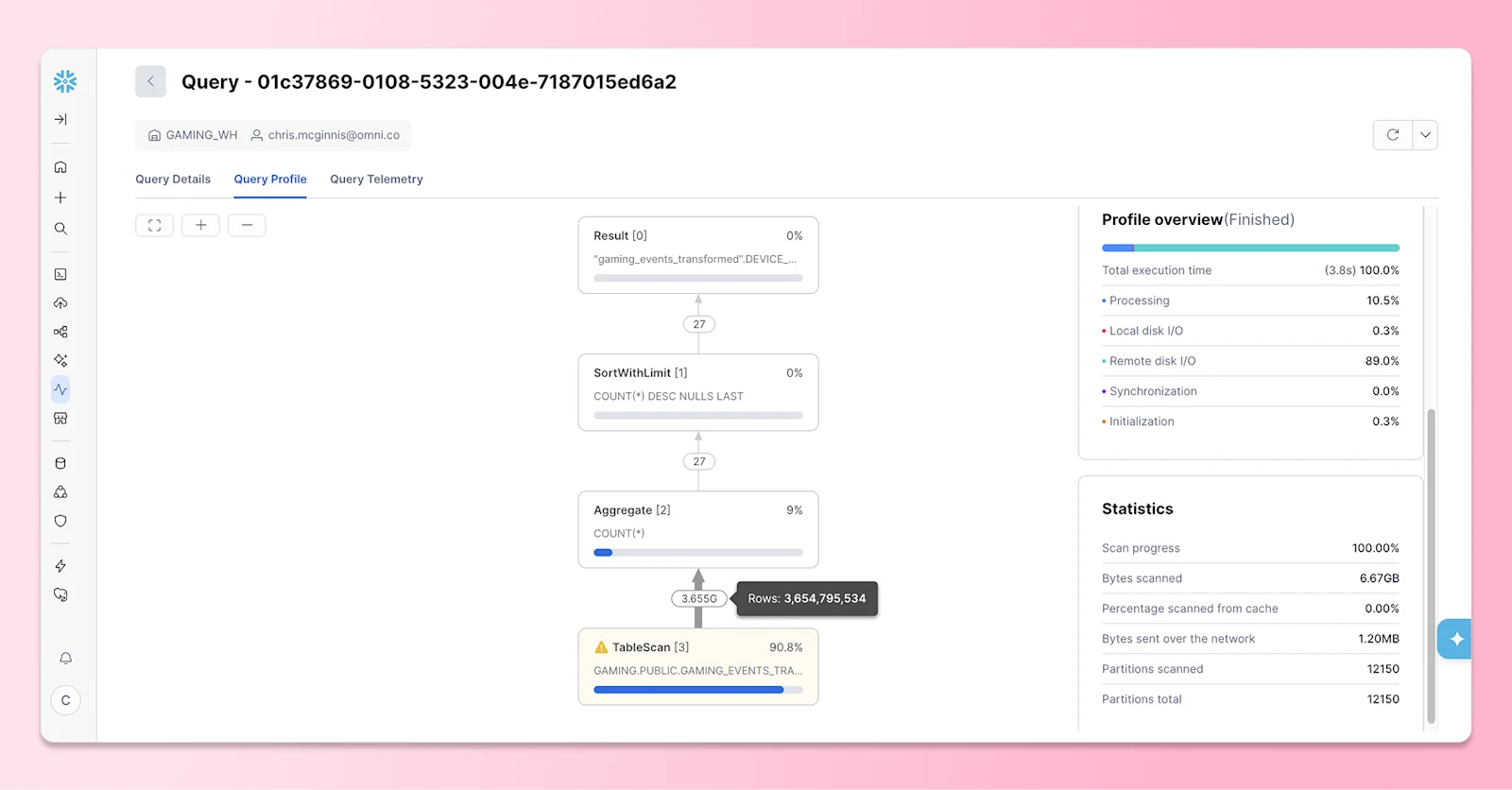
The result set was 27 rows, representing every combination of Event Name and Device Platform. The aggregations, though, were computed across every row in the table.
Run the same query again, and the results come back instantly. Omni's cache serves them from the browser without needing to hit the warehouse again.
Second test: A more complex visualization #
Querying fast is one thing, but what if you actually need to see what the data is telling you?
I visualized revenue retention by day: how much money players generate over time, split by whether they came in through an organic or paid channel.
That means plotting combined revenue against retention day for every user cohort, pivoted by acquisition source. The pivot splits the result across two panels, which also means we're able to render just shy of 100,000 data points with the chart in this example.
Omni went from query to visualization in under 5 seconds with no caching.
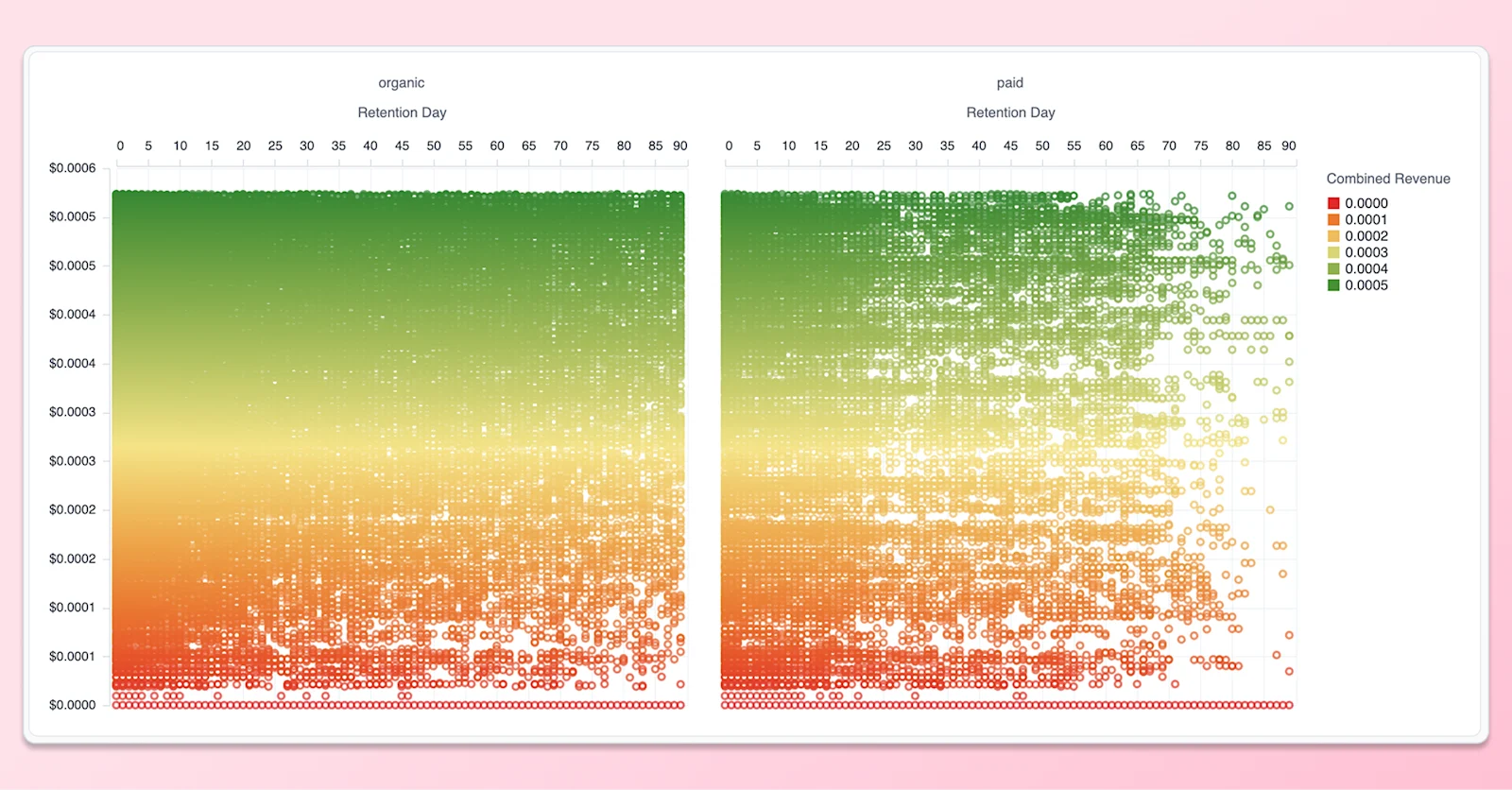
By visualizing retention with this density, we can glean insights about how players drop off, not just that they drop off. For example, the organic panel (left) is noticeably denser in the later retention days than paid (right), suggesting that organically acquired users stick around longer and generate more sustained revenue over time. Paid users, by contrast, tend to drop off earlier and stop contributing revenue sooner. If you were only running aggregated retention metrics, this trend might have been concealed by the flattening of individual users.
What’s happening behind the scenes #
Omni doesn't store your data. It generates SQL and queries your warehouse. Your warehouse scans every row in scope, returns an aggregated result, and Omni renders it.
The row limit in the browser is a UI decision. Rendering millions of raw rows in a table isn't useful. But the underlying query runs against your full dataset, on infrastructure you already own. This works the same on Snowflake, Databricks, Google Cloud BigQuery, AWS Redshift, Clickhouse, and any database you connect to.
This also applies when you create calculations from Omni’s UI. They’re not capped at what's visible on screen. Promote a calculation to run at the warehouse level, and it runs across everything. Totals are real totals. Aggregations cover every row.
And most importantly for performance, queries get cached – no matter how much data was pulled. Caching doesn’t require any configuration on your end; from the start, any repeat queries will return results nearly instantly.
You can learn more about our caching and how to customize your defaults here.
Got a big table? Bring it! #
If scale is the question holding up your evaluation, don't take my word for it. Start a free trial or request a demo, and we'll run it against your warehouse to help you get insights from your data, no matter the size.