Many executives primarily think about data as a cost. It costs money to store, process, and sometimes acquire data, plus the data team managing all of this also needs to be paid. At the same time, executives are often unsure how to measure the value they get in return.
The reason: Most companies lack a clear strategy for how to extract value from their data.
Claims that “data is the new oil” or “data is the new gold” were everywhere over the last decade, and they made it sound like all you had to do to participate in this gold rush was to track anything and everything and pipe all of it into a data warehouse.

But this perspective is missing an important element: In contrast to oil or gold, data is not inherently valuable in and of itself. The value of data depends entirely on what you do with it (or others can do with it). And even if companies are leveraging their data, they’re often thinking too small. Creating internal dashboards and reports is only scratching the surface.
Once you start looking at your data as a valuable raw material that can be refined and packaged into various data products for different audiences, you’ll find additional ways to generate value that go far beyond just traditional BI.
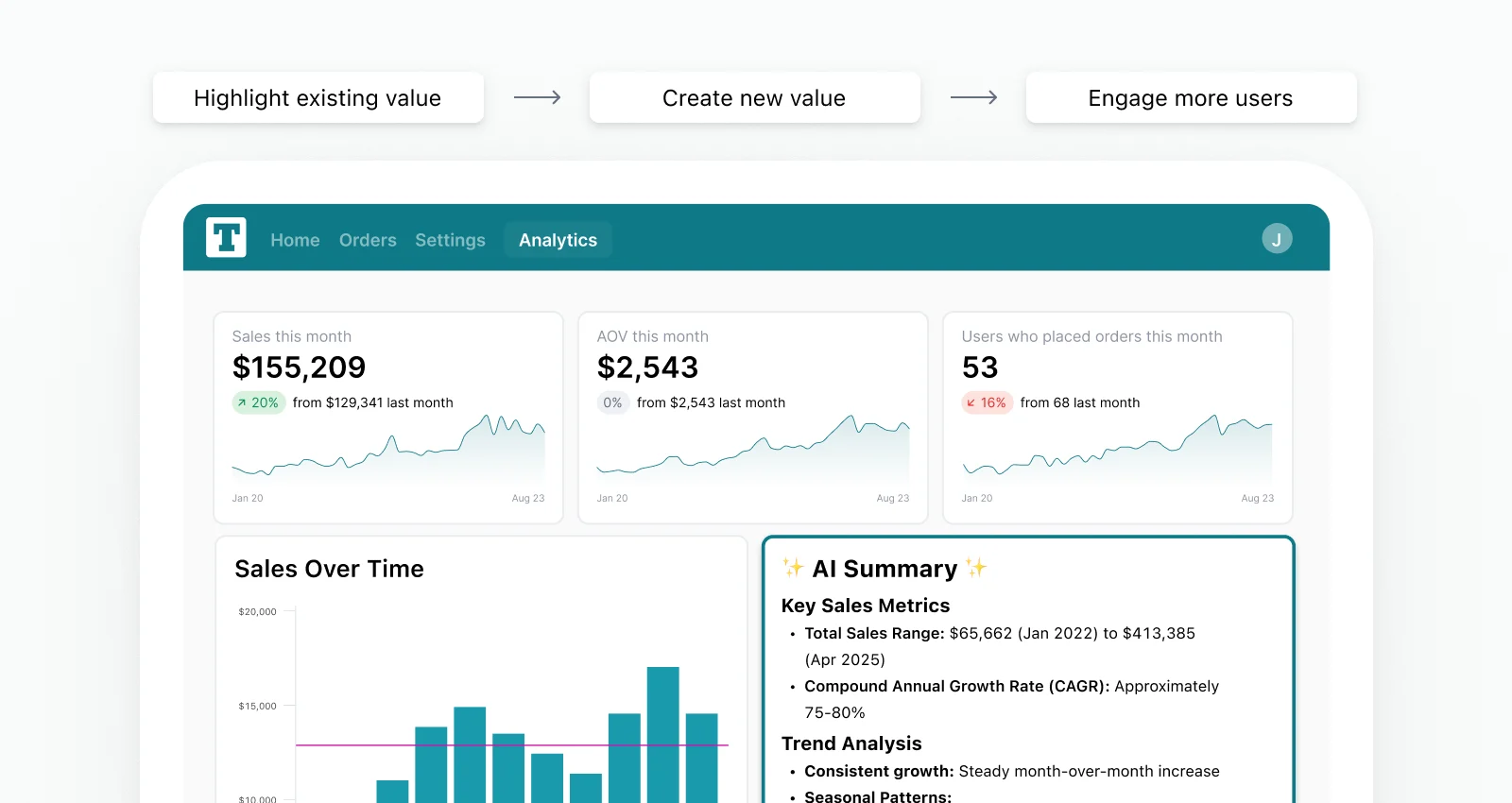
Curating and surfacing data in the right context and format to customers and users can massively increase the usefulness of your core product, improve engagement and retention, differentiate you from the competition, or even create upsell opportunities and open up incremental revenue streams.
But you can’t just dump raw data on your target audience; you have to be thoughtful to make sure it clearly communicates insights relevant to that particular user segment. After all, the real value of data is what people can do with it.
Static dashboards, even if they’re well-designed, often aren’t enough to achieve this because they put the mental load of interpretation on the user. AI can solve this, but comes with its own challenges: How can you be sure it gives accurate answers and recommendations every time, no matter what users want to know?
In this article, we’ll cover all of this in detail:
First, we’ll assess the data your business generates and discuss its potential value
Then, we’ll cover how you can identify opportunities for impactful data products
Next, we’ll walk through how to actually build your data product
Finally, we’ll talk about what you can do to make your data product successful
We’ve got a lot to cover, so let’s dive in!
How to identify valuable data in your company #
Before you can think about extracting value from your data by turning it into a valuable product, you first need to assess what you have at your disposal.
Most businesses create a lot of data as a by-product of operating their core product or business. What that looks like varies from company to company, but here are a few common categories that might apply to your situation:
User preference data; for example:
Engagement (e.g. clicks & likes) on a social media platform
Searches, bookmarks & alerts on a business travel booking portal
Transaction data; for example:
Supply & demand by time and place on a ridesharing or food delivery platform
Sales, pricing information etc. on a second-hand marketplace
Most of this data has the potential to be valuable, but not all of it is (at least not to the same degree).
Below, we’ll go through some of the key dimensions to consider as you’re trying to find the gold nuggets in your data mine, in descending order of importance:

Criterion #1: Is your data useful? #
This is the most important factor by far. If your data isn’t useful, nothing else matters. But how do you define “useful” in this context?
Data is useful for an audience if it helps them make decisions or solve problems.
There are two important considerations embedded in the definition above:
1. Whether data is useful, and how useful it is, depends on the audience. E.g. what might be extremely helpful for one segment of your users might be irrelevant for others.
→ This means you have to identify potential target audiences among your customers, users, and even prospects.
2. Data should ideally address an existing question or problem. The reaction shouldn’t be “Interesting – let’s see what we can do with this” but rather “This makes my life so much easier!”
→ This means you need to understand each target audience’s jobs-to-be-done. What pain point can your data address in an actionable way?
We’ll dive much deeper into both of these considerations in the next section on evaluating the opportunity for a data product.
Criterion #2: Is your data proprietary and unique? #
Ideally, you have exclusive control over the data in question and there is no other place to get it. Or rather, there is no other place people can get the same insights that your data provides.
For example:
If the data in question is easy to scrape from your website, it’s not really proprietary. If it’s valuable, it’ll quickly appear in other places and users are free to choose where to consume it.
Similarly, even if your specific dataset cannot be accessed elsewhere, it might not be unique. For example, if your product is an HR platform (HRIS), you’ll likely track basic data points like the number of new hires. That’s generally valuable — but chances are, your customers can also get similar (or better) hiring data from their Applicant Tracking System (ATS).
So ask yourself: What’s the type of data that only you have, and what are the kinds of insights that it can enable for your customers and users?
However, there is one caveat with regards to the above; even if data is not unique by itself, you can sometimes make it unique (and useful) by combining it with other data in ways only you are able to.

Sticking with the HR data example above:
While hiring data by itself might not be unique, the HRIS is likely the only place where it can be combined with the overall org chart, performance data, attrition stats etc. This holistic view provides a better picture of organizational health and gives the user a much better understanding of where they might need to take action.
For example, some teams might be hiring fast and seem like they’re growing successfully if you’re only tracking one metric. But, if they’re also seeing a disproportionately high share of performance management issues and early terminations, then you have indicators of fundamental flaws in the hiring process.
Finding these opportunities can turn several separate, commoditized datasets into the foundation for a data product that can become a differentiator for your business.
Criterion #3: Is your data dynamic? #
The most valuable data continually grows and changes. Static snapshots can quickly lose their usefulness as users get relevant insights from them and move on. Dynamically evolving data, on the other hand, constantly generates new, potentially valuable signals that can draw users back in and help them take action.
For example:
Let’s say your company provides a platform that lets people organize and manage events. You should definitely show historical stats like how many events someone has organized, or how many people attended. Without this data, your product would feel incomplete.
But it’s not going to be a big reason for users to regularly log in, as those numbers don’t change much. On the other hand, you may have access to additional data that is much more dynamic and valuable. For example, you can help users understand how signups are trending for their upcoming event, how that compares to past events at the same stage, how likely they are to sell out, and what the attendee breakdown is to help finalize any content and messaging.
This is relevant information that users will want to keep a close eye on (hello DAU 👋), and you can even link it to other features you might offer (e.g. paid event promotions, partner sponsorships). And it’s exactly the kind of data that AI can turn into a concise, actionable briefing with clear recommendations, but I’ll share more on that later.
How to evaluate an opportunity for a data product #
Now that you have a framework for thinking about the potential value of your data, it’s time to get specific. To get started, you’ll need to pick an audience and decide what you want to build.
At a high level, you have two options:
1. Data products focused on attracting new customers or users: Standalone, data-powered tools or resources that attract traffic & convert it to new customers or users
Location: Typically on dedicated landing pages on the company website
Example: A mortgage rate calculator on a mortgage fintech website
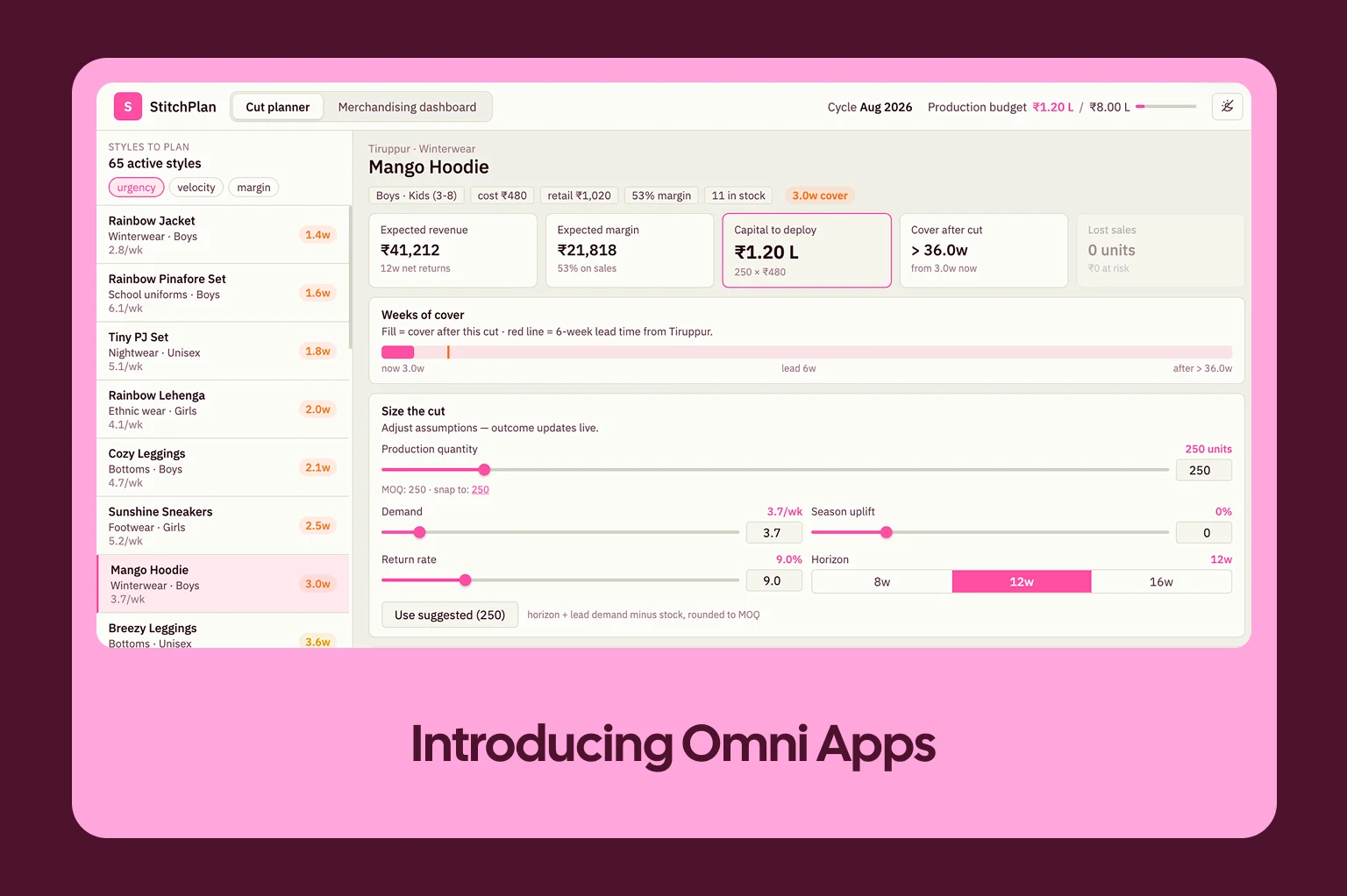
2. Data products for existing customers & users: Embedded analytics for existing users inside your product that improve the value of your core offering (either offered for free to improve engagement and retention, or packaged as a premium add-on)
Location: Within the core product
Example: In-app dashboards and reports in a fitness app that help you optimize your workouts
Note: Data products can also be a hybrid; they can target both existing as well as prospective customers and achieve multiple goals at once.
For example:
Spotify’s famous year-end “Wrapped” report is generated in-app for existing users to remind them of how much they used (and enjoyed) the app. But at the same time, it’s designed to be shared on social media and draw in new users.
—
The above tells us who we can build for; but it doesn’t tell us what to build yet.
This part might seem overwhelming at first glance, but the solution is somewhat simple: A data product is — surprise! — a product. And as with all product development, it helps to start by understanding your target audience and their needs, and then work backwards from there.
That’s what we’ll cover next.
Use case #1: Designing an external data product for potential new customers / users #
The goal of a data product for prospective customers or users is to 1) be useful so it attracts potential users (often through Search Engine Optimization (SEO) or Answer Engine Optimization (AEO)) and 2) draw them into your main offering (e.g. by demonstrating its value, or by presenting your core product as the obvious next step).
Ask yourself: What pain points do prospective customers or users have that your product can help solve?
Common Google or LLM search queries can give you inspiration here. In addition to showing you what problems users are facing, they also give you a clear path to organic distribution. After all, people can’t find your product useful if they can’t find it at all.
In addition to solving a real problem and ideally addressing common search queries, an effective data product for prospects also:
Is easy to use: Requiring complex user inputs or skills creates friction, which will cause people to abandon it. This usually means simplifying the product and focusing on a particular use case
Creates delight: If users are genuinely excited about the data product, it has the potential to go viral
Converts: Ideally, the logical next step after using the data product is to use the core product
Let’s look at a few best-in-class examples of what this can look like in real life:
Example deep-dive: Zillow Zestimate #
Zillow is a real estate website, and its “Zestimate” tool lets you view an estimated market price for any real estate property in the US.
Why does this work?
Traffic acquisition: The tool is available on the website — no login required. And it directly answers common search questions like “How much is my home worth?”, generating plenty of free traffic from Google (and potentially LLMs in the future).

Ease of use: All you have to do is enter an address and click a button, and voilà — the tool pulls up an estimate from the database.

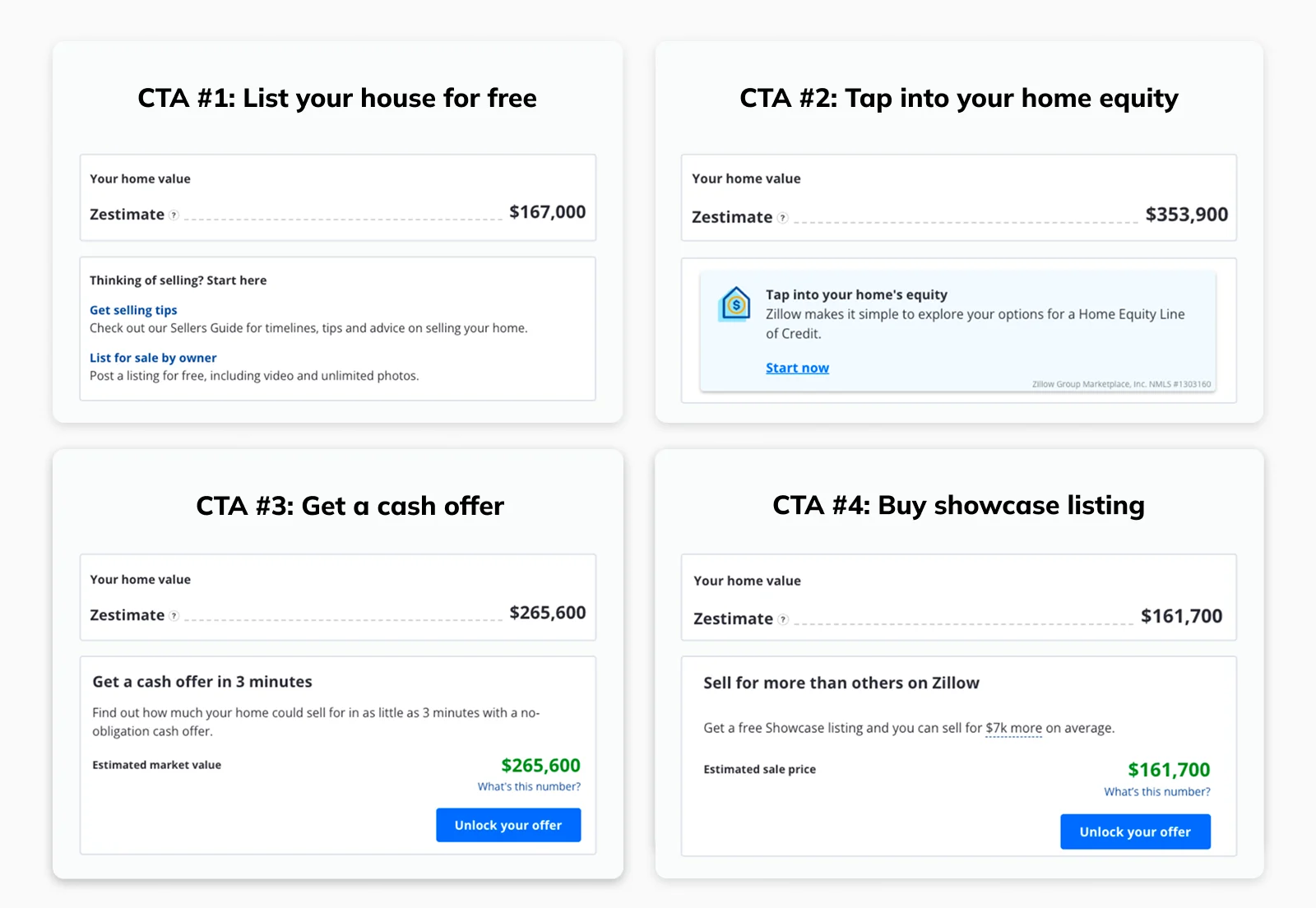
Conversion: Depending on the status and location of the house, you’ll be presented with one of these four Calls-to-Action (CTAs), asking you to either 1) list your home, 2) take out a loan, 3) request a cash offer for your house, 4) or pay for a featured listing. Each CTA directly converts you into a user of one of Zillow’s core product lines.
Example deep-dive: Going.com #
Going.com is a flight booking website that lets you set alerts for routes you’re interested in and then notifies you about relevant offers and cheap flights. On its website, it features data products like the one below that tap into the data of its core product.

This works for the same reasons as Zillow’s Zestimate above; 1) this data-backed overview is the direct answer to common search queries like “best times to fly to mexico”, 2) it doesn’t require any complex inputs or configuration, and 3) it converts visitors to registered users as the next logical step is to sign up for a Going account and set price alerts.
Use case #2: Designing an embedded data product for existing customers / users #
The purpose of a data product for prospects was clear: Get more customers or users.
Embedded analytics within your core product can help with that, too: Most customers expect extensive analytics features, so building them will make it much easier to close deals (talk to your Sales team and dive into the notes of lost deals in your CRM if you want to validate this).
But the value goes far beyond this. Regardless of what your product does, users will inevitably reach a point where they need to dig into the data. Without built-in analytics, they’ll export data into Excel and/or use third-party tools that have the capabilities you’re missing. Either way, they’ll spend less time in your product. And over time, missing features and workarounds start to impact retention.

If you’re “lucky”, customers will let you know about their frustrations and, instead of churning, request data from your Customer Success or Support teams or submit requests for custom features to Product. However, fulfilling these requests only acts as a band-aid for individual customers and can lead to a massive drain on your resources.
Intentionally designed in-product analytics, on the other hand, give you a more scalable solution; instead of doing ad-hoc data pulls or creating custom reports, you invest resources once and get something that adds value for all customers and gives them a reason to spend more time in your product.
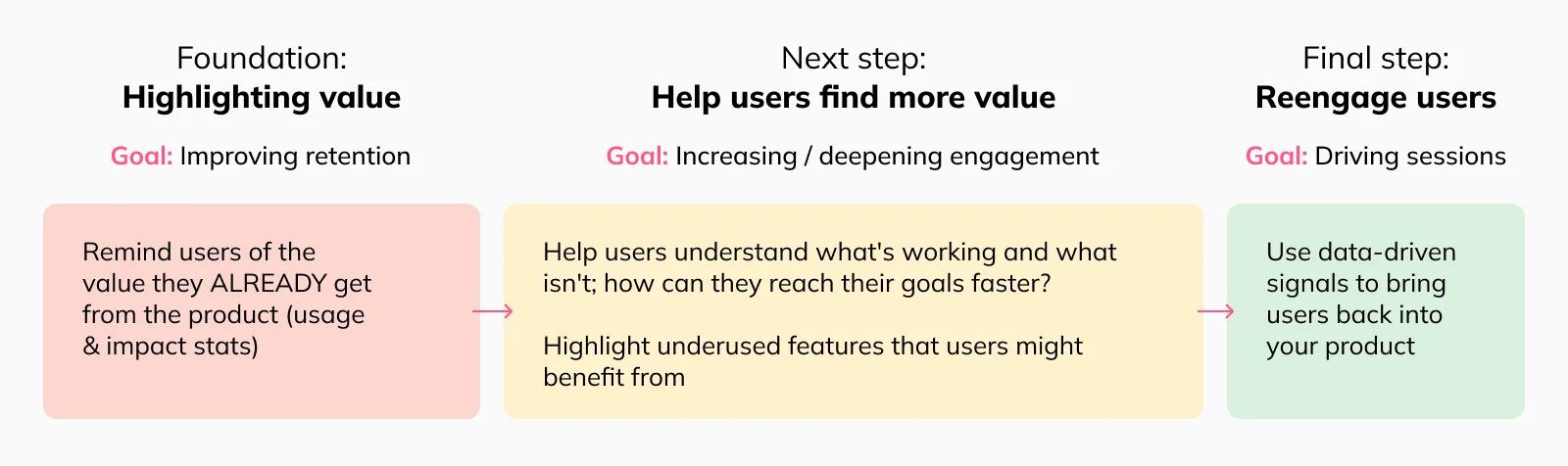
In-app analytics can also be a powerful way to remind users of the value they’re getting from your product; how much they’re using it, how many problems they’ve solved, or even how much money they’ve made. Which provides a great foundation for the next use case: Helping your customers get even more value.
How can users reach their goals faster or more efficiently? Ideally, your in-product analytics tell users what’s working and what isn’t by identifying where they need to take action and where they should double down. For example, Uscreen provides creator analytics on their streaming platform to make it clear what content is the most popular with the creator’s audience and how they can grow their community faster.
What useful features aren’t they using today? Most users aren’t taking advantage of everything a product has to offer. For example, you could surface that users haven’t set up alerts, automated workflows, or used other features that similar users are finding valuable.
Combined with push notification and/or emails, you can also create a powerful re-engagement loop that leverages analytics signals to draw users back into the product and drive sessions.
Scoping your data product #
Now, this only tells us why we might want to embed analytics within our product. It still doesn’t tell us what exactly we should build.
To understand that, we’ll need to dig into the data and talk to users:
How are your users using the product? Aggregate data on usage patterns, session replays, and user research sessions can give you insights here
What ad-hoc data analytics requests do they send to the Support team or their CSM? If your product doesn’t have robust analytics capabilities, chances are, your customer-facing teams are currently filling the gap at least to some degree
What feature requests are you getting? Customers, especially your power users, will often vocally tell you what they’re missing
What complementary analytics tools exist for your product? Lack of in-product analytics is often seen as an opportunity for tools (or entire startups) adjacent to your business. For example, limited pricing analytics and guidance for hosts in Airbnb’s early product spawned a whole ecosystem of tools doing exactly that
This exercise should give you a pretty good idea of what type of analytics you could build out. But remember, not all data is equally useful, and the same applies to the analytics and data-powered features you build on top.
Here’s a simple hierarchical framework to help you think through this:
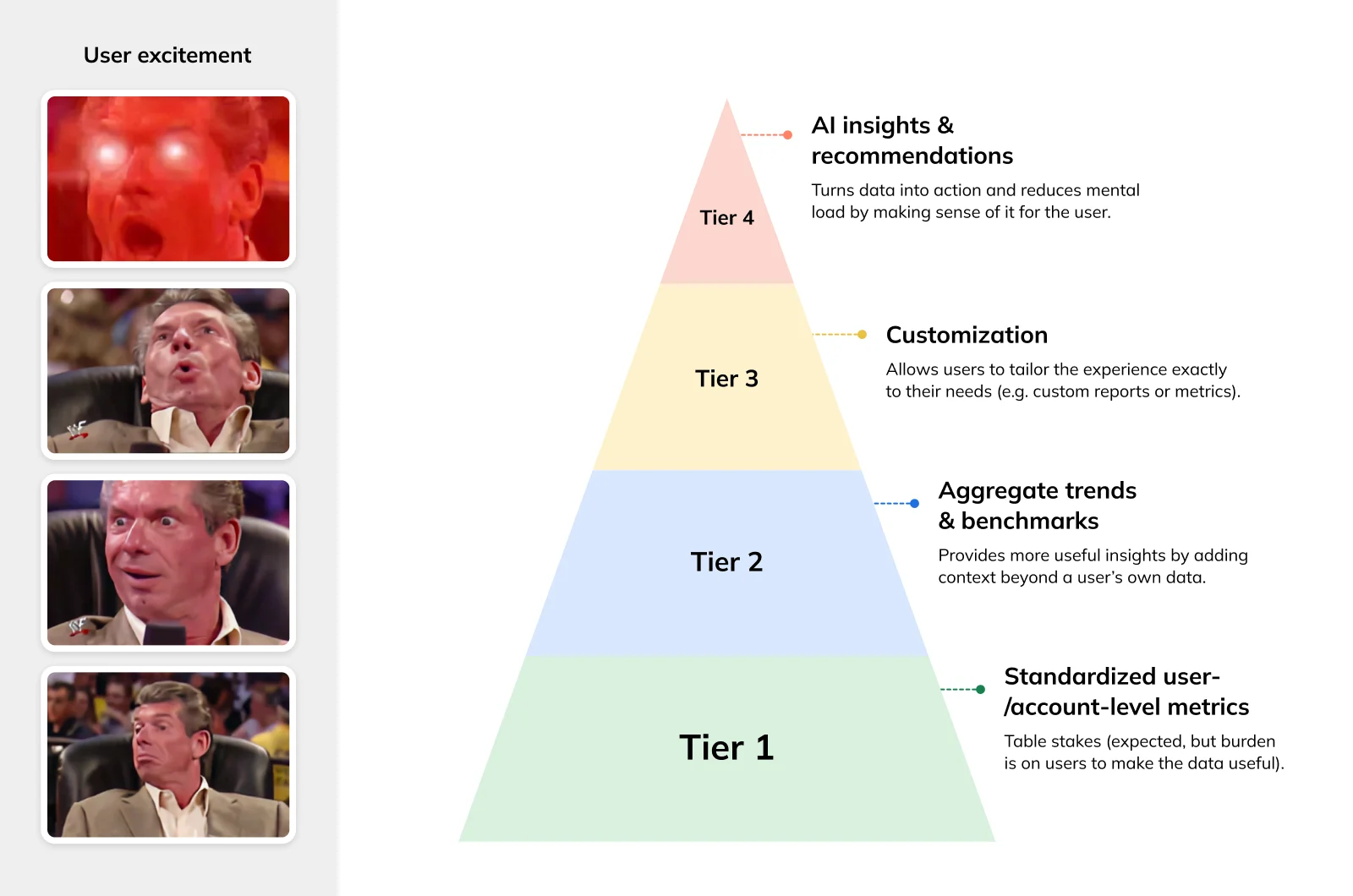
Tier 1 analytics are table stakes
This tier includes foundational data such as standardized stats about users’ past activity within your product. Customers expect you to offer these reports, but they’re not going to be a differentiator, and you shouldn’t expect a huge lift in engagement metrics.
Example: Sales and revenue by product in an e-commerce tool
Tier 2 metrics go one step further to give users additional context for interpreting data
These stats include aggregate trends or benchmarks that put an individual user’s metrics into context. However, it’s still a “one size fits all” experience where your product team needs to anticipate what metrics users will be interested in.
Example: An online course builder benchmarking stats like completion rate against other similar courses on the platform
Tier 3 & 4 provide customization options and AI to deliver personalized insights
At these levels, you’re making sure users get exactly what they need to solve their most pressing problems instead of just drowning them in more charts.
Customization: Customer- or user-specific data cuts tailored to a particular business or use case (e.g. customized reports or custom fields)
Example: A creator analytics report with audience insights based on custom segmentation
Insights and recommendations via AI: Timely, personalized, and actionable insights based on users’ own data as well as broader trends delivered through AI
Example: A content creation and Answer Engine Optimization (AEO) tool that recommends focus areas based on past performance data and overall trends
—
Finally, there’s one more important consideration that can make or break the success of your initiative: Many products have different distinct user groups, and these user groups often have very different jobs-to-be-done. And as a result, they’d benefit from very different data products.
To better understand this, let’s look at an example.
Example deep-dive: TikTok #
I’ve never spent a single moment on TikTok, but from what I’ve been told, there are at least three different stakeholder groups with different needs.

Regular users who are looking for interesting content
Creators trying to grow their accounts
Advertisers trying to promote products or services
Since each group 1) has different goals and 2) does different things in the product, both the data they generate as well as the metrics and insights they care about are very different. Each group has specific needs for tailored in-app analytics for their particular use case rather than generic reports.
Regular users don’t need any analytics on a daily basis as they’re not trying to run a business or optimize anything…and they may not even want to know just how much time they spend in the product each day.
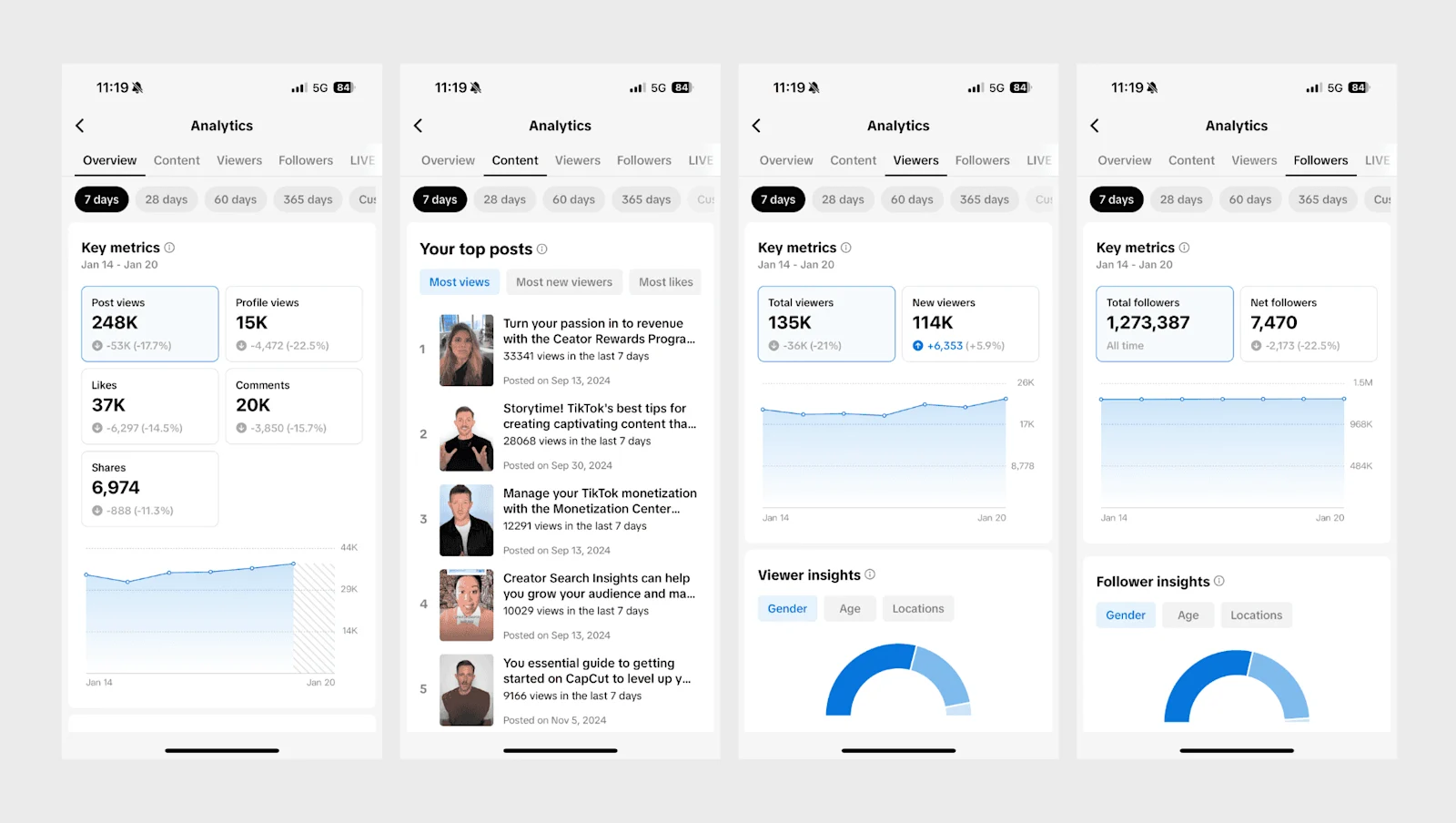
Creators, on the other hand, need to understand how their content is performing and what they can change to increase their follower count. TikTok’s answer: “TikTok Studio”.
Applying our framework from earlier: Tier 1 metrics for creators include stats like views and watch time or visualizations showing where most users drop off during a video’s play time.
In addition, TikTok lets creators understand overall search trends and trending videos (Tier 2), and provides an AI assistant that helps with anything from identifying new video ideas to optimizing performance (Tier 4).
Lastly, advertisers need detailed reporting on ad groups and individual campaigns to understand both how much reach their ads are generating as well as how this translates to down-funnel outcomes like clicks and ultimate conversions. While TikTok offers fairly comprehensive standardized reporting in this area, custom fields would make the reports even more useful (e.g. allowing advertisers to define and track custom ROI metrics).
The million $ question: How should you price and package your data product? #
There are two questions you need to answer here:
Do you charge for your analytics features?
If you do, how do you decide which features should be part of what pricing tier?
There are a lot of considerations factoring into these decisions, but here are a few key dimensions that can get you started.
Competitive situation: Are competitors offering analytics features, and if so, are all of them available to all users? If that’s the case, you might want to consider focusing on closing this gap and giving broad access (at least initially)
Importance: It’s easier to justify premium pricing for your analytics features if they’re essential and — ideally — generate measurable value for your users (e.g. help them grow revenue or decrease costs) rather than just being a collection of “interesting” charts that are nice to look at
Cost: If you invest a lot of resources into developing complex analytics features, you might want to amortize that investment
Next, assuming you want to limit some features to premium tiers, you need to figure out which features to offer in which tier.
In most cases, it makes sense to offer basic analytics for every customer and user, regardless of tier. First of all, customers expect this, and being overly restrictive in this regard can lead to increased churn and difficulties acquiring new customers. Not to mention, the more users can access your data product, the bigger the potential for increased engagement.
Features that are good candidates for premium tiers, on the other hand, are:
Benchmarks and other insights leveraging data across the wider user base
Customization (e.g. letting users create their own metrics or reports, or tweak existing ones)
AI-powered chat or personalized recommendations
In other words, anything that is a true value-add for users and makes their lives much easier (e.g. by eliminating an additional tool or step from their workflow). For example, Brevo expanded its in-app analytics, strengthening differentiation in new deals and driving upsells with existing customers.
Going back to our hierarchy from earlier, this means that it usually makes sense to offer Tier 1 and potentially Tier 2 insights to everyone while reserving Tier 3 and/or Tier 4 for premium tiers.
The problem is that even if these features are great, it can be difficult to demonstrate their value to users that haven’t tried them yet. There’s only so much you can do with marketing copy or video demonstrations.
As a result, you might want to consider a reverse trial. In a reverse trial, new customers get complimentary access to premium features in the beginning; then, after a certain amount of time (e.g. one month), they’ll lose access if they don’t permanently upgrade.

Let’s go through an example to see what this looks like in real life:
Example deep-dive: Parenting apps #
Any parent will know this: There is a product — and app — for everything now, including apps to help you track daily activities like feedings, diaper changes, and sleeping.
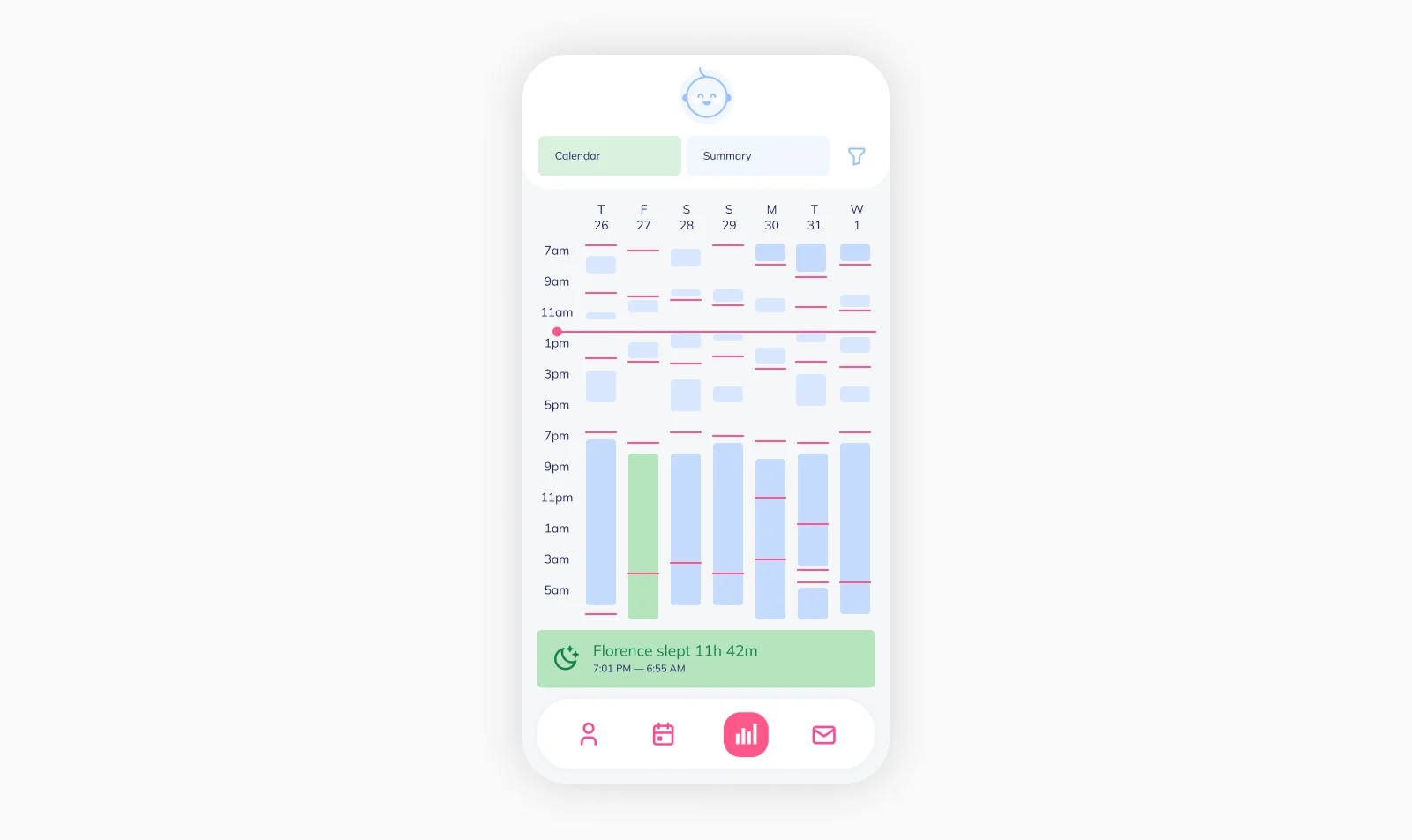
Many of these apps offer free versions for basic tracking with simple summary reports to show you how much (or little) your child did something. However, it’s increasingly common to offer more detailed reporting and suggestions, such as ideal nap times, at a premium subscription level.
To give parents an opportunity to try these premium analytics features and see if they’re helpful, you can often get complimentary access for a short period of time (the reverse trial discussed above).
As a result, instead of deciding whether to try the advanced analytics features that might be useful, at the end of the trial period users have to decide if they want to give up the feature they’ve already tested extensively (and in many cases found extremely valuable and built habits around).
Creating a flywheel #
As mentioned previously, when we talked about Spotify Wrapped, a data product can target both existing and prospective users or customers at the same time.
The holy grail is to design your data product around a network effect so that when you use it to attract new users, the usefulness of the data product for both existing and prospective users increases.
What does this mean? In the Spotify case, when users share their “Wrapped” on social media, they might draw others back into the app (or prompt those without an account to check it out). But those new users don’t make Spotify more useful — or next year’s Wrapped more fun — for everyone else. There are no network effects, and it doesn’t create a flywheel.
In contrast, let’s look at the following scenario:
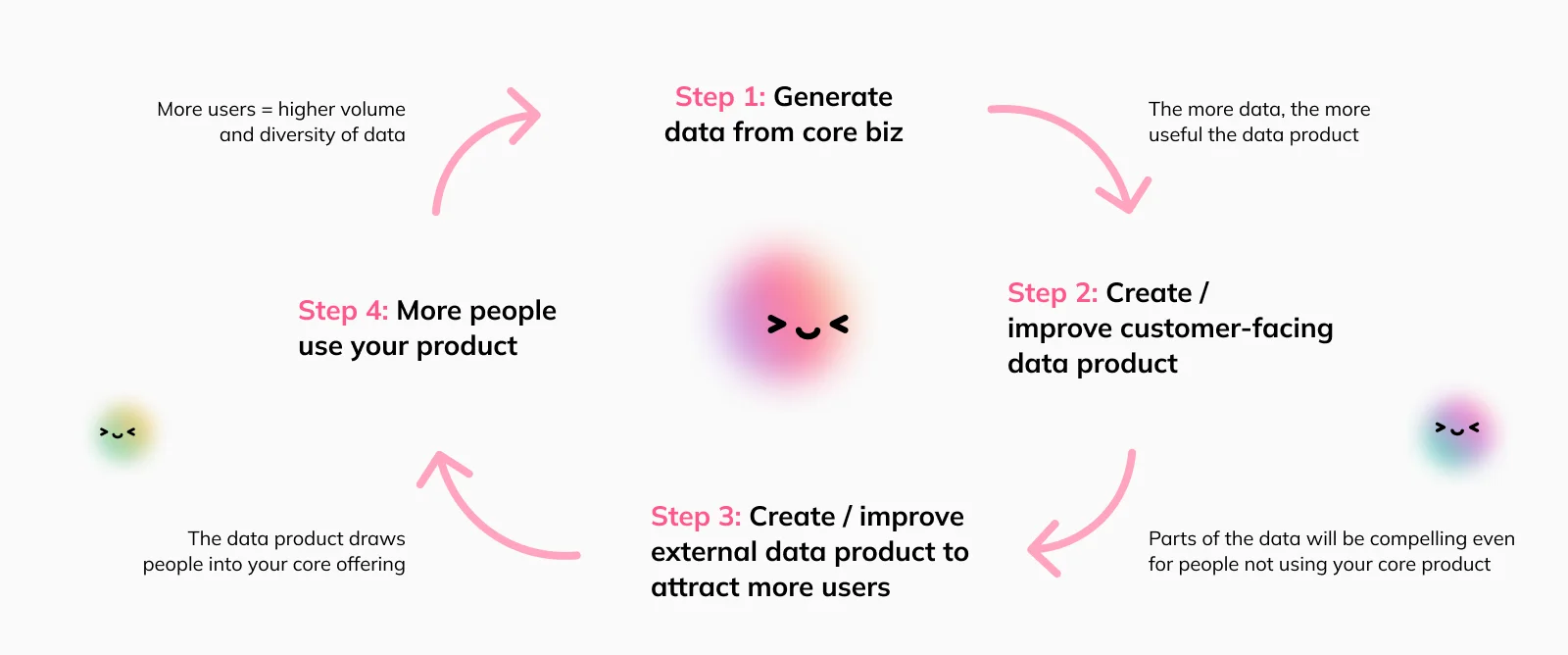
Step 1: You run a marketplace for secondhand fashion. To help users price their products, you create an embedded data product for sellers that shows pricing trends over time and suggests a price range for items during the listing process to maximize conversion. This is based on the data you collected from previous transactions through the platform
Step 2: Then, to acquire more users, you’re adding a simplified version of this data product to your website that allows users to quickly look up the current market price for any designer handbag
Step 3: This data product is effective because 1) it’s useful and solves a real problem, 2) answers common search queries, 3) is easy to use, 4) and it converts; the logical next step after learning the price of your bag is to list it on the marketplace
Step 4: And that’s where the network effect comes in: The more users you acquire, and the more bags are being sold via your platform, the better your data gets. This makes your pricing tool more useful for both existing users as well as prospects
How to build your data product #
Once you’ve figured out what data product could be valuable, you need to create it. When it comes to a tool on your website focused on acquiring new users, your requirements are likely modest given the limited scope and functionality.
However, if you’re building something customer-facing that’s embedded into your core product (or a flywheel like described above), things get more complex. For example, customers want interactivity and the ability to customize. At the same time, you have to make sure the data they look at is correct at all times.
And things get even more challenging once AI is in the mix. Users increasingly expect interactive AI features, and in-product analytics are no exception. But while AI has the potential to be a massive value-add, it amplifies all of the challenges you’re facing when building a data product: In addition to “just” making sure pre-built views are correct, all of a sudden you need to deal with non-deterministic responses and the potential for hallucinations.
So, what can you do? As always, you have two choices: Build or buy.
“Build” means you’re going to build the data product from scratch. Not just the user-facing frontend components, but the entire foundation as well such as security, user management, metric governance, and performance controls.

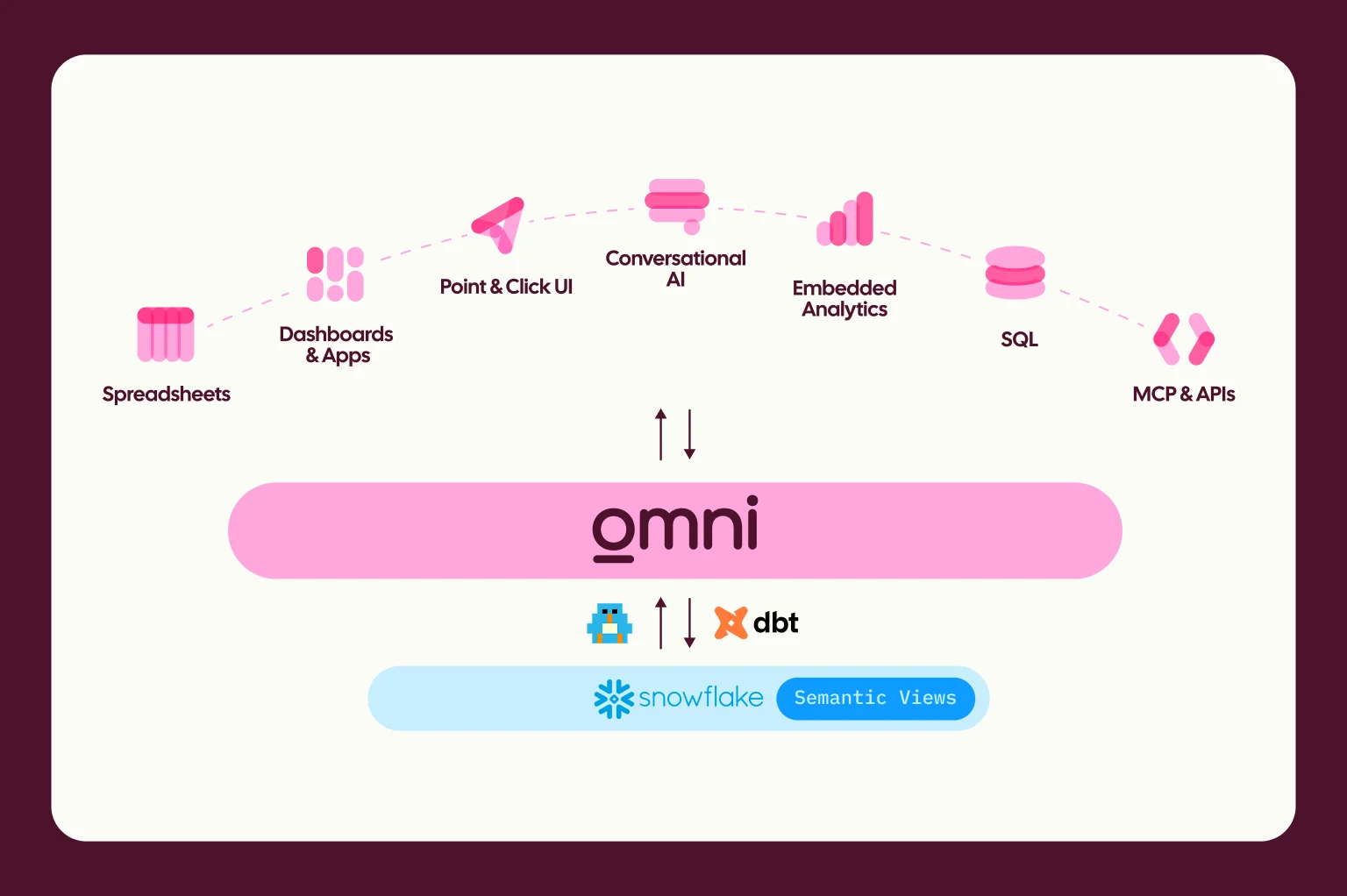
“Buy” means you’re choosing an embedded analytics provider and then customizing the solution to fit your needs and product design. You can think of this as a variant of the BI tools you’re likely familiar with; but instead of internal dashboards and reports they power customer-facing data apps.
Typically, this means a trade-off. To decide what’s best for your situation, it’s helpful to think through what building and maintaining an embedded analytics product requires, and then pick the option that most closely aligns with your needs and priorities:
TL;DR #
As with most build-or-buy decisions, the biggest draw of building the solution in-house would be the ability to design every detail just the way you want it. If you have extremely specific requirements, know exactly what you want, and an initial evaluation finds that existing solutions cannot deliver on everything, building can be a viable path.
However, in most other scenarios, you’d pull away valuable engineering and product resources to build something that you could get launched to market much faster with a vendor.
Control and customization: Providing a seamless user experience #
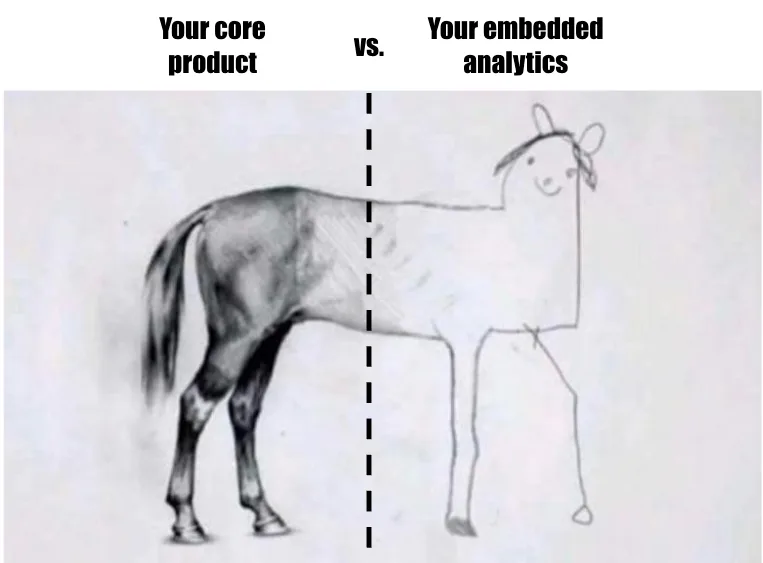
As mentioned, if you want to be able to tweak how every little thing works and looks, building in-house gives you full control. Embedded analytics solutions allow varying degrees of customization; some are somewhat restrictive and the end result feels “bolted on”, while others let you seamlessly blend each part of the experience — from the look and feel to analytical flexibility — into your core product.
What to look for in an embedded analytics solution:
Extensive self-serve and customization features that let you tweak the functionality and content of dashboards, reports, and even metrics precisely to customer needs (including the ability to build custom charts and fields)
The ability to control the entire look and feel of the application, incl. CSS and markdown support
Proof; marketing promises are one thing, but case studies of customers that have successfully adapted the embedded analytics solution to match their product UI and brand guidelines show you that it actually works
Feature breadth: What capabilities do you need on day 1? #
Building your own analytics product from scratch will take a long time; as a result, you’ll likely start with an MVP with limited functionality, and it will take months or years to develop, test, and ship all the features customers ask for.
Depending on your intended use cases, that might be acceptable; but if you need a comprehensive set of features on day 1, buying can massively speed up your time to market.
What to look for in an embedded analytics solution:
Multiple intuitive interfaces that cater to the preferences and skills of different audiences (e.g. dashboards, spreadsheets, querying, natural language)
Advanced analytics features like AI and predictive analytics (making sure they’re available when the product is embedded)
Data governance: Accuracy and permissions aren’t optional #
As discussed, giving customers access to data comes with many opportunities — but it also presents a risk. If you show data that’s wrong, and users make decisions based on it that end up backfiring, it can have severe consequences.
This means you either have to 1) build a semantic layer to standardize the data model and core metrics for your product, 2) choose an embedded analytics solution that has this functionality, or 3) limit users to a few vetted reports that you can guarantee are accurate.
Security and permissions are a similarly sensitive topic: It’s not enough that data is correct, you also need to ensure that the customer or user in question is supposed to see it.
What to look for in an embedded analytics solution:
A semantic layer that makes it easy to define standardized metrics across all customers, as well as has the ability to support customer-specific metrics and definitions
Robust security and permissions, including attribute-based access controls and row-level security that extend to AI and MCP (see below)
Software development lifecycle controls (SDLC) that allow you to safely test changes and updates before rolling them out to customers.
AI features: A non-negotiable in 2026 #

User expectations have changed. Where AI features were a nice-to-have only a few months ago, they’re more or less expected at this point. It can be tempting to just point an LLM at your data and let users chat with it, but that’s going to cause more problems than it solves. You need the right foundations in place to give users a frictionless experience while ensuring accuracy at all times.
Among other things, you need to make sure the AI has the right context, learns and improves over time, respects permissions, and responds quickly and accurately in a format that works in the context of your product; otherwise, it’s a risky gamble that can quickly go wrong.
What to look for in an embedded analytics solution:
A comprehensive set of AI features. Natural language chat is just one option, but there are more ways to bring AI into your customers’ workflows with helpful summaries & recommendations, and dashboard helpers to answer follow-up questions
A semantic layer that allows you to curate context and define workflows for AI to ensure reliability and help AI understand what matters to your customers
An MCP server so you can bring analytics functionality into existing AI experiences you have (e.g. a general-purpose chatbot in your product, your AI support agent etc.)
Scalability: Don’t let engineering become a bottleneck #
Most of the real challenges in maintaining an analytics product pop up over time as you scale the number of users while continuing to make changes based on learnings and customer feedback.
With a homegrown solution, engineering will quickly become a bottleneck for any changes. And, if you haven’t built a robust shared data model as a foundation, the complexity of keeping every customer’s reports accurate will increase exponentially.
What to look for in an embedded analytics solution:
Low-code or no-code options for developing data products so Product and Customer Success teams can ship independently of engineering constraints
Robust Git integration, version control, and testing environments so you don’t risk breaking things (and showing customers broken things!) as you continue to build out your data product
Performance: Users want answers NOW #
Finally, it doesn’t matter how helpful and intuitive your data product is. If it doesn’t load quickly, users will run out of patience and stop using it. If you’re a data person reading this, you may know what it’s like to get complaints about slow dashboards from internal stakeholders. But for in-app analytics, we’re now talking about your customer experience.
Customers will have much higher expectations and want answers fast. If you plan to serve up mostly simple reports of pre-aggregated metrics, this will be less of a concern regardless of whether you build or buy. But if you want to let users explore and drill into granular data, you’ll quickly run into latency issues and skyrocketing data warehouse bills.

What to look for in an embedded analytics solution:
Modern architecture that integrates with your data stack & storage (Snowflake, Databricks, AWS Redshift, Google BigQuery, Clickhouse, etc.)
Sophisticated caching that guarantees fast load times and limits unnecessary queries to the data warehouse
Making your embedded data product successful #
Creating an embedded data product requires an investment, whether you choose to build or buy. As a result, it’s key to treat it like any other product and make a holistic and continued effort to make it successful.
In addition to what we discussed above, there are two key considerations:
Distribution #
As discussed above, data products for attracting new customers ideally come with built-in distribution as they address common search queries or LLM questions. However, for embedded analytics, it’s not that simple. If you just build these features and move on, you’ll likely be disappointed by the adoption and engagement rates you see. You don’t want to exclusively rely on users reading the announcement email or clicking through the menus to find it.

At the same time, growth product teams are constantly looking for new “signals” or “triggers” they can use for emails and push notifications to draw users back into the product and grow sessions.
The best data products solve both of these problems by serving as a “signal generation engine” for user-facing comms. AI-generated summaries and takeaways provide ideal copy for push notifications or emails to draw users back into your product and get them to explore the analytics features specifically. And after a while, users will build habits and come back even without any active reminder.
Iteration #
Lastly, the first version of your data product that you ship shouldn’t be the final one. Initially, you have to work from first principles and guess what will be useful to your users. However, once they start using the in-product analytics, you’ll get valuable data to refine your offering.
What types of pre-built reports get used the most?
Which reports get shared with other users?
What types of customizations are users making to get insights that aren’t available out of the box?
Do users still contact Customer Success or Support because they cannot get certain answers from the analytics features? If so, what are the most common requests?
What questions are users asking AI?
This last bucket is likely the biggest data treasure trove of all. Instead of trying to infer what users find helpful from proxies like usage patterns, they are literally telling you what they’re trying to accomplish via their natural language queries.
In addition to informing your feature roadmap, you can also use this data to decide what defaults to show new users who haven’t customized their analytics yet. Nobody wants to click through five filters and dropdown menus before they see something valuable, so anticipating users’ needs goes a long way.
However, while you should be iterating on and improving your analytics features over time, you don’t want to risk breaking things in production and showing customers wrong data. As a result, it’s key you’re leveraging SDLC workflows. For internal analytics it’s an extremely helpful best practice; but for customer-facing analytics, it’s a non-negotiable requirement.
As CTO, it’s crucial to me that we can test changes before deploying to our customers. Omni was the first tool we saw that truly struck the right balance of giving our customers more flexibility, while keeping our team in control.
Arsh Mand, CTO & Co-founder at Workramp