Editorial note: This case study is built on a presentation by Sarah Fischbach, Staff Analytics Engineer, at Checkr
As a provider of fast, accurate background checks for some of the largest companies in the world, Checkr understands the importance of trust.
In 2024, Sarah Fischbach, Staff Analytics Engineer, was initially hired to build Checkr’s trusted data models to support self-service across the business via their hub-and-spoke model. At first, this worked because their primary data consumers were domain experts with a deep understanding of the business data.
Then AI changed how people expected to consume information. Suddenly, their data foundation wasn't just for the experts; it was for everyone, including agents.
The data team realized bringing AI into their data workflows was inevitable, so they set out to build a structured foundation to ensure that AI would meet their standards. This initiative led Checkr to unify its BI + AI workflows grounded in Omni’s semantic layer, giving both humans and AI the context and guardrails to scale self-service.
Here's a look at how they built it.
Key takeaways #
Designed AI context from existing institutional knowledge: The team built a pipeline that pulls existing context directly from Zoom meeting transcripts, Confluence pages, Slack threads, and PRDs into Omni's AI context and semantic layer.
Built and iterated a structured loop to monitor and improve AI reliability: Using Omni's AI Hub for usage monitoring and a repeatable testing cycle, the team tracks AI responses and clarifications to continually improve AI answer quality.
Cut time-to-insights from hours to minutes to change behavior in real time: When an ops leader asked what queues drove First Reply Time (FRT) below 90%, the answer that previously would have taken hours came back in minutes, allowing the team to change how they responded.
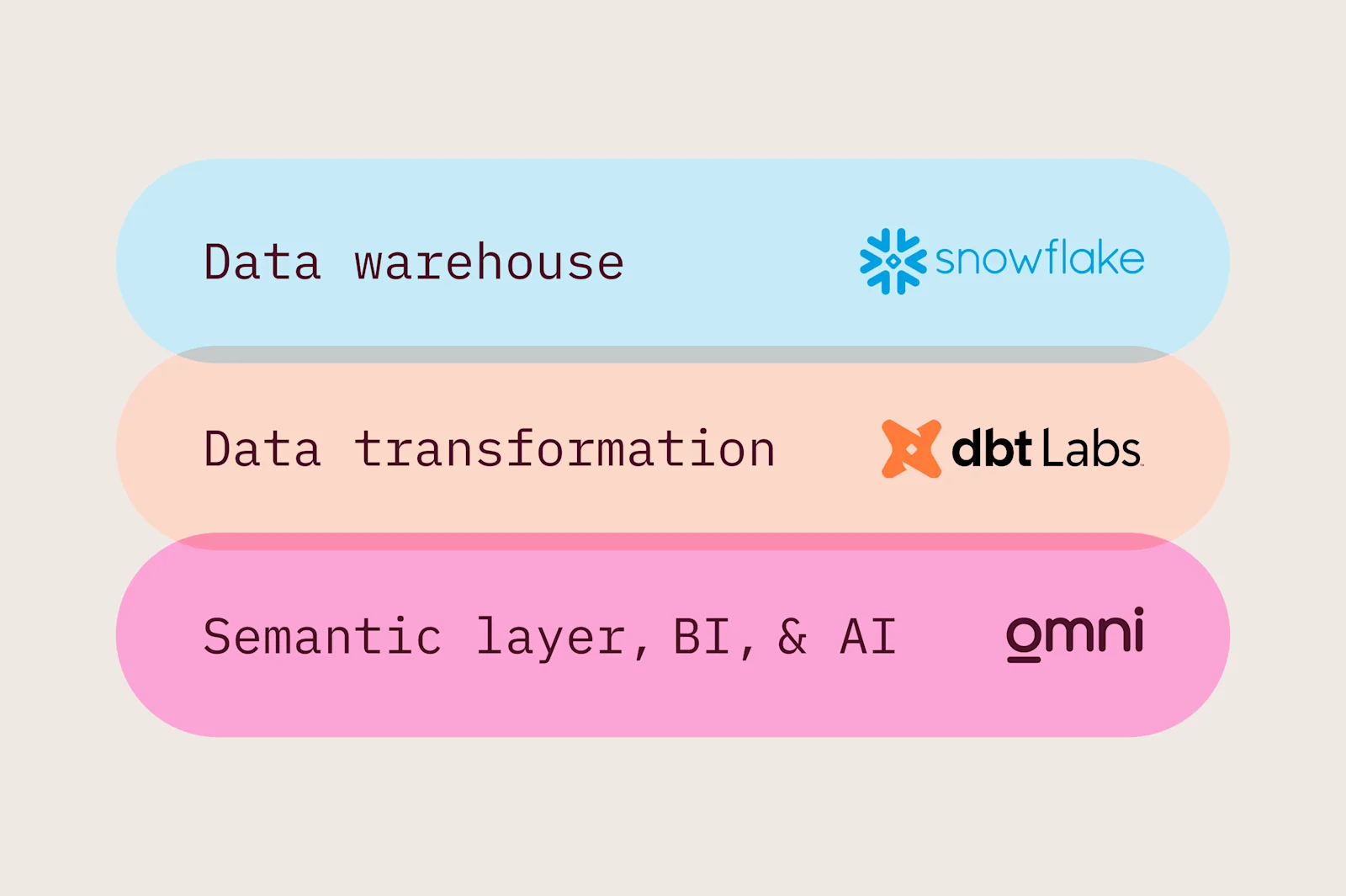
Checkr's data stack
Building a governed foundation for AI #
As the data team prepared to build for AI, they identified potential risks and ran experiments to help them avoid future production errors.
Before getting started, they ran a test by connecting an LLM directly to their data warehouse. The same question returned different (incorrect) answers every time. “For a question that required a join, the LLM didn't even try. It just picked a random field on the same table and called it good enough,” Sarah adds.
“Asking a question of AI without any context is like hiring a brilliant analyst who shows up every morning with no memory of your business. Every single time, you have to re-explain your metrics, which tables matter, and what the acronyms mean.”
— Sarah Fischbach, Staff Analytics Engineer
This problem is called metric drift, and Checkr wanted to proactively solve for it by building a foundation on a semantic layer to give AI context and guardrails.
After evaluating several platforms, they chose Omni. To accelerate their timeline, Checkr worked with Shearwater Data, an Omni implementation partner. Shearwater used Omnify, a tool they built to automate Omni migrations, to give the team a strong starting point so they could focus on validation and refinement rather than rebuilding from scratch.
How Checkr thinks about AI context
The data team wanted to pull Checkr's institutional knowledge into the model to help AI reliably answer common questions and more vague ones, such as “how did my team perform last quarter?”
They thought about what information was available as well as where it should live in their data stack👇
Snowflake data warehouse: Stores every data point, aka “the complete dictionary”
Omni’s semantic layer: Defines “the grammar” — metric definitions, joins, and valid calculations
Omni’s AI context: Builds “fluency” by adding all the additional context that doesn’t typically live in data systems, but helps AI understand and speak about the business to users who don’t understand SQL
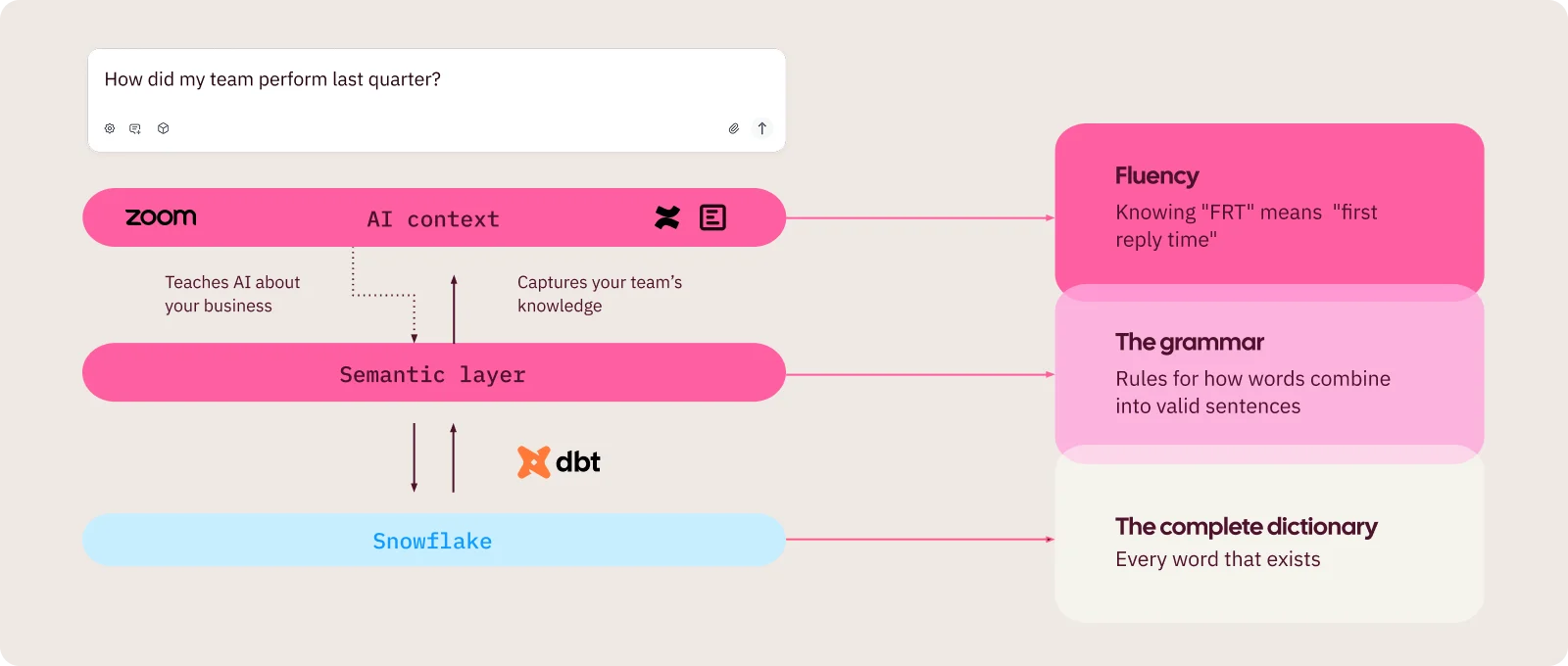
“The semantic layer is deterministic and precise; it defines what calculations exist. We use Omni’s AI context to be conversational and contextual, to help AI understand how we talk. We don’t duplicate across the layers; we use them to translate so that Omni’s agent can have a real conversation with someone who understands our business but doesn’t write SQL.”
— Sarah Fischbach, Staff Analytics Engineer
Designing for AI by bringing in untapped, existing context
One of the first things the team recognized was that the context they needed already existed, just not in their data model.
It lived in Zoom meeting transcripts, Confluence pages, PRDs, tech specs, and Slack threads. Metric definitions, business logic, design decisions, and edge cases were already documented; they were just scattered across tools that had nothing to do with data.
The challenge was making all this context useful for AI. Naturally, the team used AI and automation to make this task manageable.
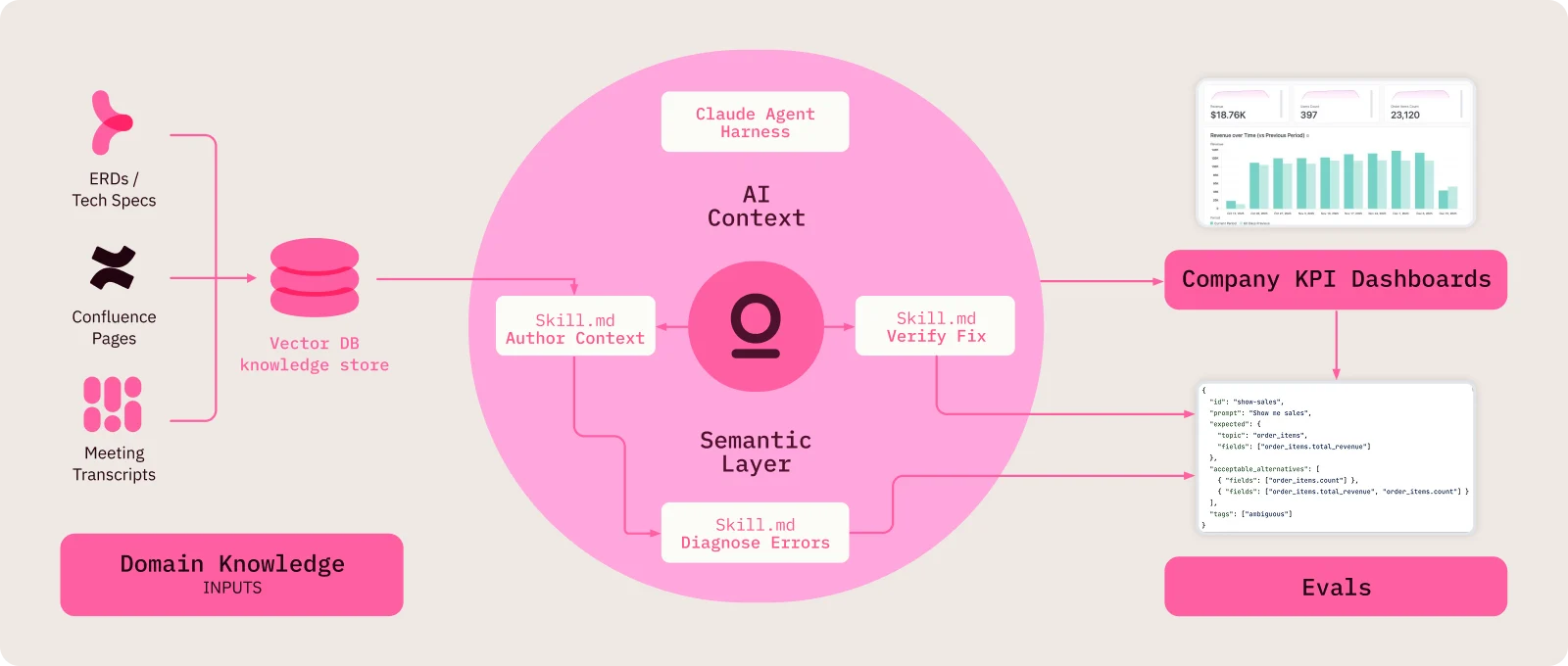
Here’s their process: #
Input 1 - Knowledge store: Vector database holds team documentation, data dictionary definitions, Confluence pages, Zoom meeting transcripts, and other institutional context. Extraction processing runs on the raw sources before they're stored.
Input 2 - Eval set: Canonical exec dashboards for their most important company metrics, used to run evals with specific prompt questions and expected answers. A Python script pulls all cases into a full eval set.
The agent harness omni-eval-iterator: A Claude agent harness runs an eval-driven development loop that connects the two inputs. It has three sub-skills:
omni-eval-diagnoseruns evals against main, analyzes results, identifies clusters of failures, and presents options for which cluster to fix first.omni-context-authorreads from the vector DB knowledge store and Omni's AI context standards, then drafts updated AI context for the failing cluster.omni-eval-verifyreruns the failing cases on a feature branch with the new context and compares results to main. It reports the lift and recommends whether to merge and move on, or iterate again.
The data team treats the LLM-generated AI context as a first draft, so they can review, cut filler language, and add edge cases.
“The specific tooling here is less important than the principle: we built a pipeline that takes unstructured knowledge that already exists in our org and turns it into structured AI context.”
— Sarah Fischbach, Staff Analytics Engineer
Sarah’s guidelines for distilling context:
Gather your artifacts: Think about your commonly used apps, docs, and Slack threads. “You'll be surprised how much usable AI context comes out of a single stakeholder conversation.”
Paste into any LLM with these instructions: Extract sample values, identify synonyms, write behavioral guidance, and flag edge cases, defaults, and jargon. “The goal is terse, dense, instructional text written for AI, not conversational documentation written for a human.”
Review, add, and test: Review for accuracy by pasting into Omni and asking real questions. Monitor and iterate with the feedback loop.
Structured fields in Omni give AI context
Field | What it does |
|---|---|
Synonyms | Map business language to field names & give language for how to refer to a field or metric |
Sample values | Teach AI what values are stored in the database (Channels: Email, Phone, Live Chat) |
Field descriptions | Business definitions and logic for humans and AI |
AI context | Behavioral guidance on how AI should use a field |
Sample queries | Pre-built examples of complex analyses beyond single metrics |
“Your stakeholders often have analytical questions that are complex, but predictable. These are those multi-step analyses that come up again and again. The semantic layer gives you the building blocks — the fields, joins, and metric definitions. But it doesn't tell the AI how to assemble them for a specific kind of question; that’s where Omni’s AI context comes in. Sample queries are pre-built examples of those common complex analyses to show the AI what good looks like.”
— Sarah Fischbach, Staff Analytics Engineer
How Checkr tests and improves over time #
To keep up with their evolving business and questions, the data team runs a repeatable feedback loop:
Ask using stakeholder language and ambiguous requests. The goal is to surface confusion before stakeholders do.
Watch where the AI agent gets confused. Clarifying questions, wrong fields, rabbit holes, dead-end searches, excessive redirects. “These are signals, not failures,” explains Sarah.
Fix by matching the problem to the right solution:
Wrong field → add synonyms or sample values
Too many clarifying questions → add Topic-level defaults
Rabbit holes → add query rules and clarification rules
Can't find the right field → add field descriptions and AI context
Excessive redirects → add behavioral guidance to the Topic
Retest the same question. Verify the improvement before moving on.
As part of their ongoing testing, the team tracks Omni's AI usage via the AI hub to monitor for opportunities to improve and evaluate changes.
“Giving AI context isn’t a one-time project; it’s a loop and a part of the job now. However, just like everything in data, there’s a way to add structure to it.”
— Sarah Fischbach, Staff Analytics Engineer
The business impact of AI: Saving hours and changing behaviors #
The entire purpose of the AI initiative is to improve self-service and help everyone use data to do their jobs better and faster.
One of the early time savings came from when one of their Operations leaders asked: "Which queues led FRT SLA to fall below 90%?"
“This question looks simple, but it’s not,” explains Sarah. “To answer it correctly, the AI needs to know FRT means 'first reply time,' and that 'FRT,’ ‘SLA attainment,’ and ‘SLA rate’ all resolve to the same field. It needs to understand that channel response targets differ across chat, phone, and email. And it needs to know that missed and abandoned calls automatically fail SLA. Finally, successfully answering this question requires a structured answer to identify the pattern, driver, and impact.”
None of this is information that lives in the data warehouse. It was all added in Omni’s semantic layer and AI context to define the terms, map the synonyms, describe rules for missed and abandoned calls, and lay out the desired root cause framework for responses.
Within minutes, a response came back that previously would have taken hours. More importantly, the response came fast enough that the team was able to change their behavior to improve.
Omni’s AI agent identified the underperforming week, broke the analysis down by queue and channel, and pinpointed the primary driver. It also noted that the high-volume queue everyone would have suspected was actually performing fine.
“What would have taken hours got done in minutes, with enough directional clarity to actually change how we responded.”
— Christian Shrader, Operations
What's next for Checkr #
The foundation is designed to extend. Currently, most users at Checkr access Omni’s governed data from other workflows via the MCP Server.
Next, the team is continuing to work on making more of its data AI-ready.
They’re also working on “self-driving data,” which opens deeper analysis for everyone by encoding more expertise into the model. Here’s the idea:
Every time an analyst answers a recurring customer question, the agent captures the work behind it (the query, the business logic, the way that customer talks about its data) and feeds it into Omni's semantic layer and AI context
Each answer becomes governed, reusable context instead of a one-off
That loop makes it possible for everyone to ask deeper questions in plain language because the context is already in place.
The judgment stays human, and the access opens to everyone.
None of this is far off. It runs on the same foundation, just aimed at bigger questions, where the answers still have to hold up to meet Checkr’s standards.
If you’re interested in working with Sarah and the team, Checkr is hiring 😉