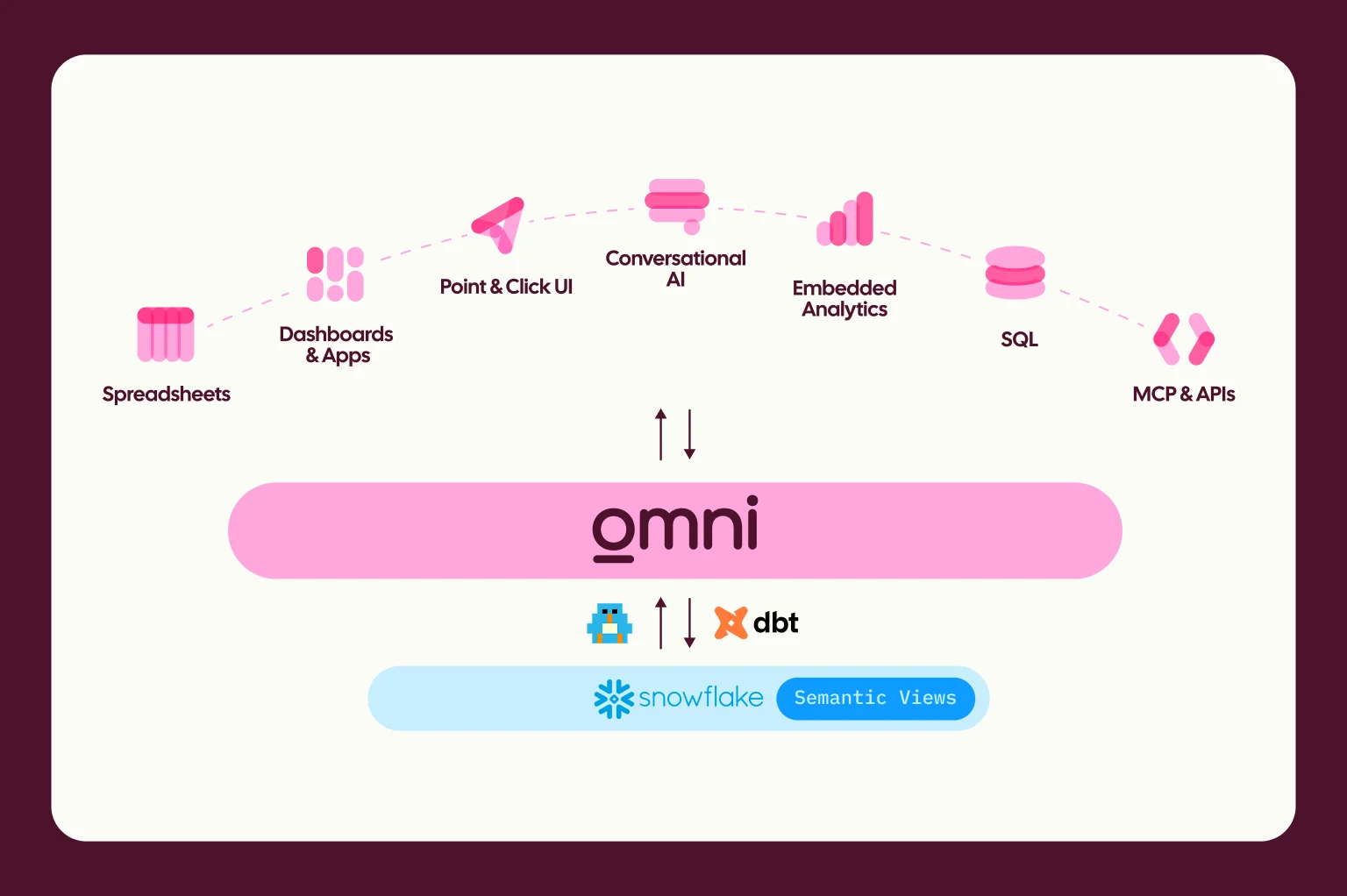
Omni inherits context from the data warehouse and transformation layers beneath it, pushes definitions back to those systems, and exposes its semantic layer through open interfaces. This interoperability is how Omni seamlessly integrates with tools like Snowflake and dbt, and why we’re developing partners in the open semantic layer interchange (aka Ossie).
For teams using Snowflake and Omni, we’ve worked closely with their product team to make it easy to model and sync across platforms. Snowflake’s Semantic Views are treated as their own objects, as Topics (curated datasets) in our semantic model. And we’re proud to have the only two-way integration, which lets you develop in both platforms and sync back in either direction.
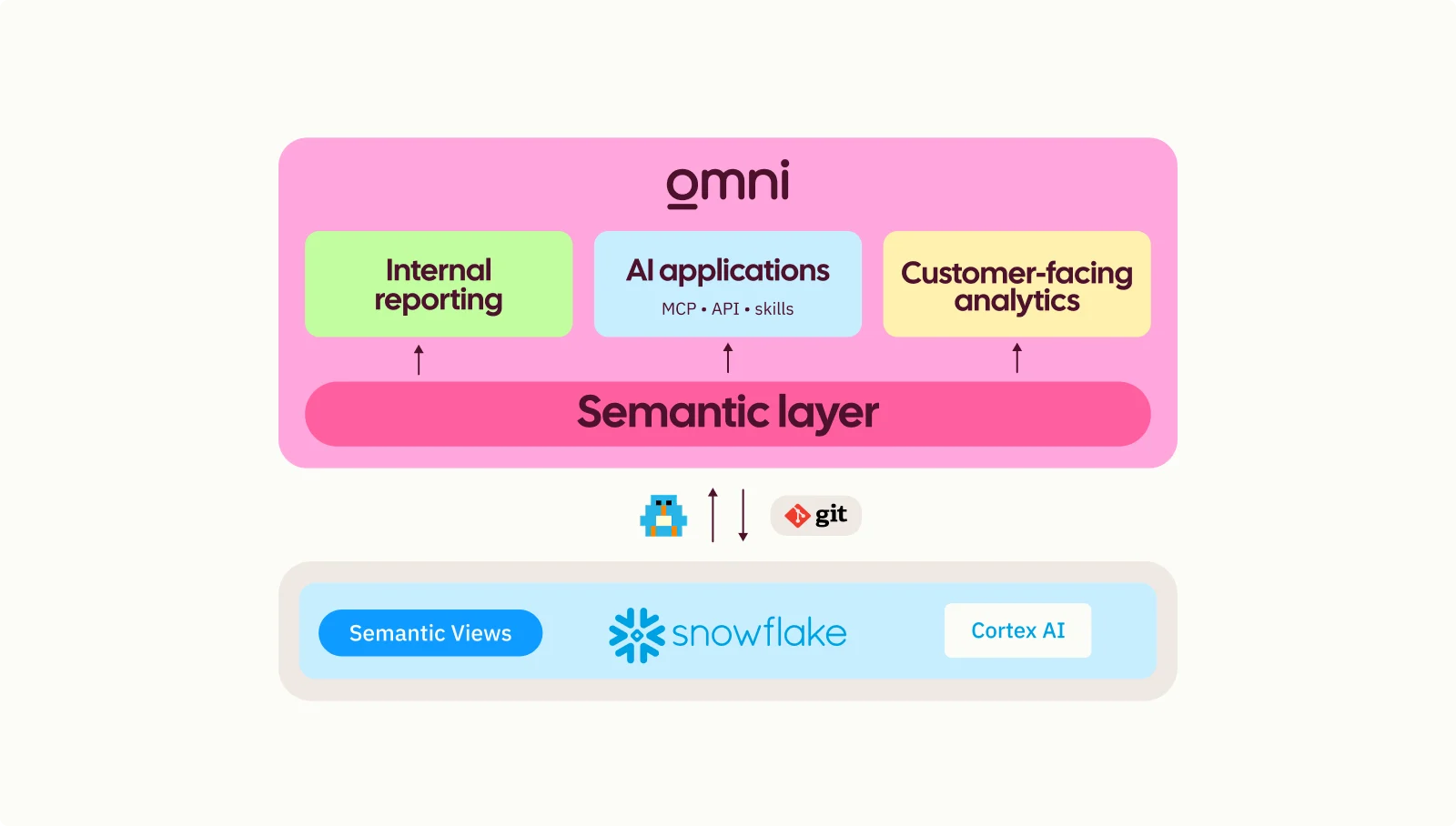
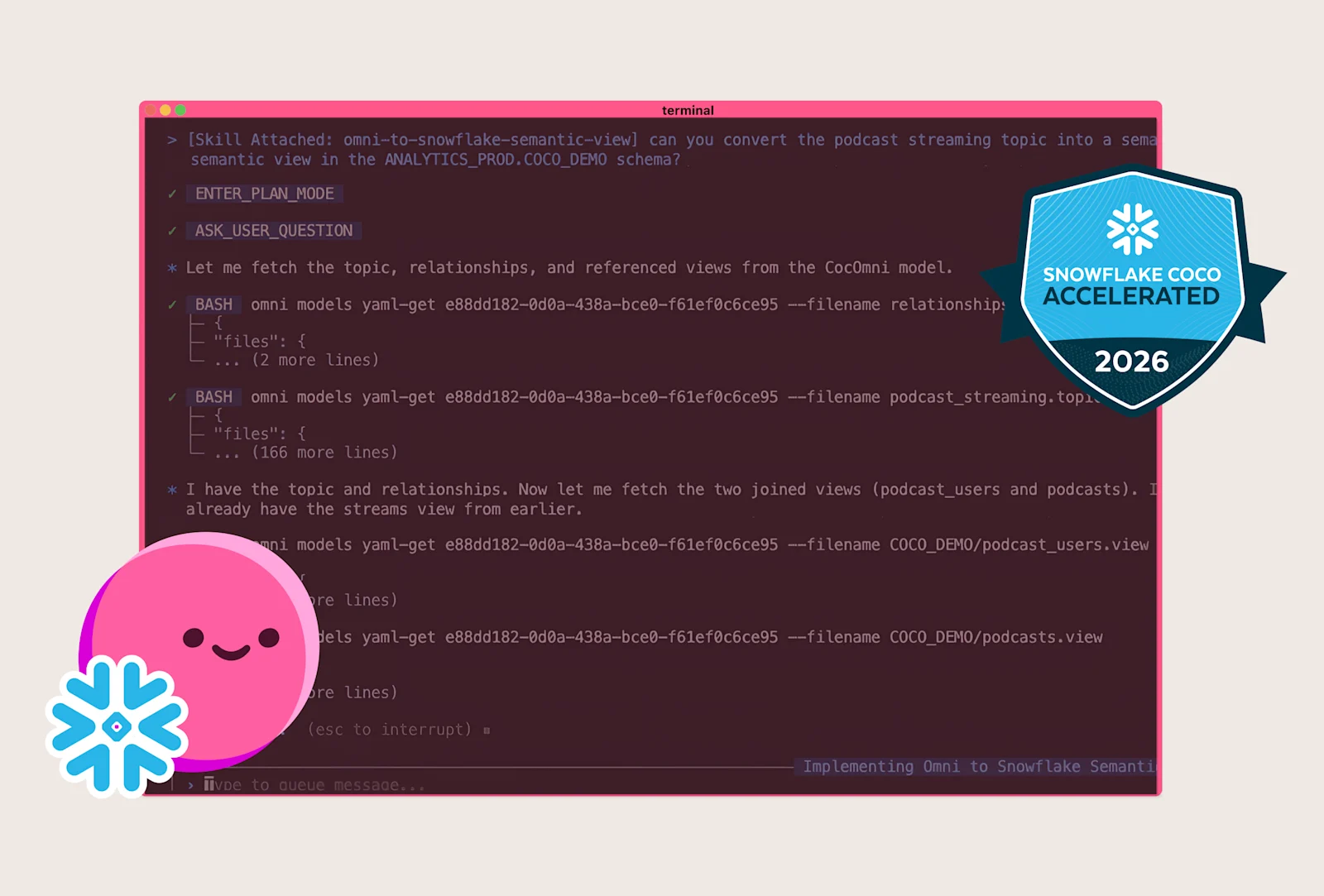
In this blog, I’ll walk you through how to think about modeling in Snowflake and Omni. I’ll also share demos of our integration going both ways, including how you can use Omni Skills for Snowflake CoCo to push curated Omni Topics and write them back to Snowflake as a Semantic View in a single CLI call.
Building metrics in the warehouse with Snowflake Semantic Views #
For a brief intro, Snowflake Semantic Views are schema-level objects built directly in your warehouse alongside your data. They help add business meaning by providing consistent metric definitions across analyses.
At their core, Semantic Views are YAML-based definitions for a domain-specific analysis comprising dimensions, facts, measures, and joins. Semantic Views can also provide instructions to the LLM on how to generate SQL based on how your company conducts analyses. For example, how your reporting should round numeric values or all percentages should be multiplied by 100.
Snowflake has been developing these as first-class objects to power governed analytics in CoCo, Snowflake Agents, and CoWork. These objects help ensure AI responses don’t hallucinate or return varying results across users by providing consistent metric definitions and logic across queries.
Semantic Views can be defined through SQL, dbt, Snowsight, or CoCo, so they’re typically built and maintained by data engineers.
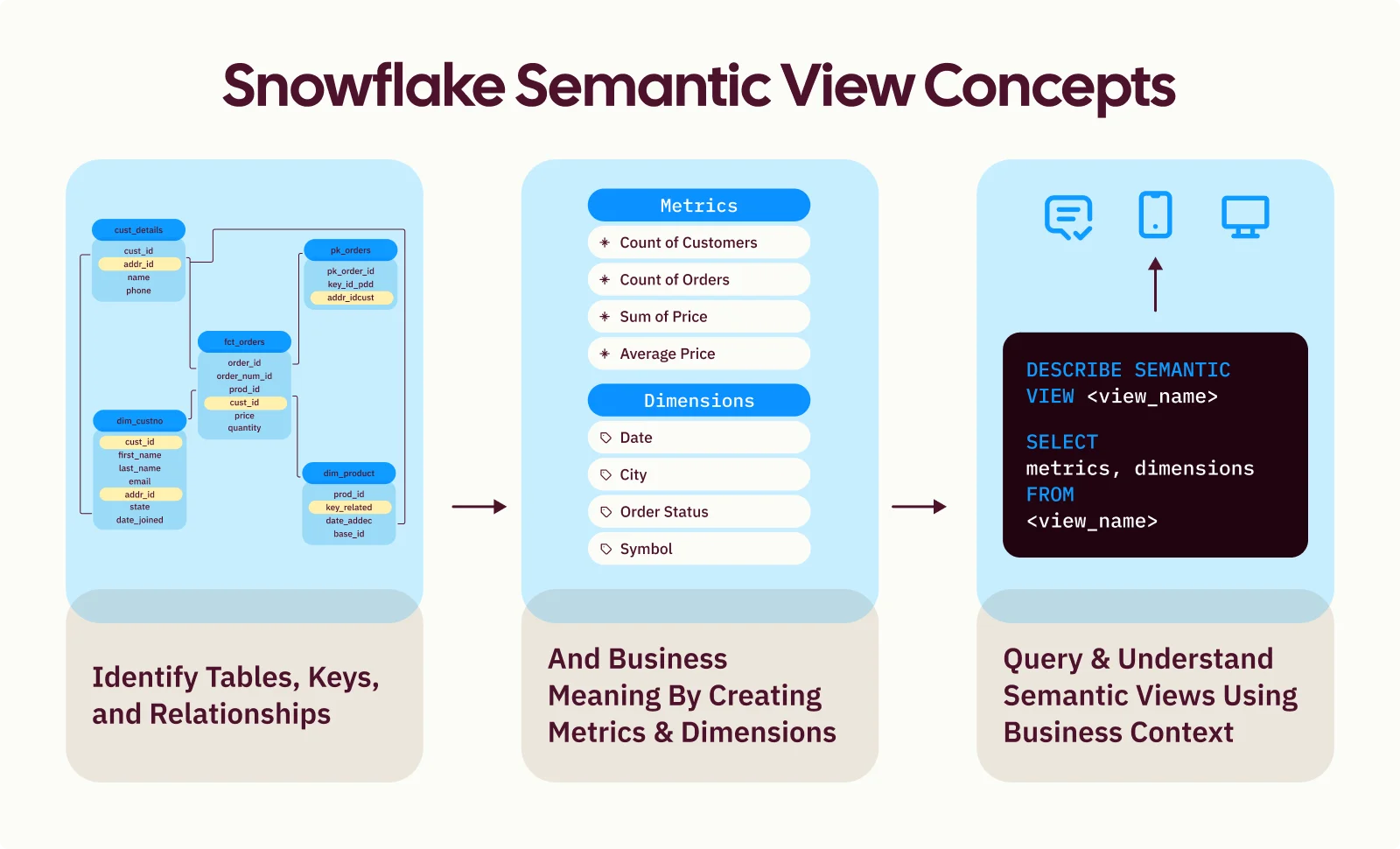
Image inspired by Mayur Mahadeshwar’s post: How Omni brings Snowflake Semantic Views to life
The best use cases for Snowflake Semantic Views #
When you’re building metrics in the warehouse, focus on hardened metrics that won’t change. This is because they typically require analytics engineering cycles to update and test, and because they can serve a variety of downstream tools. For example, Snowflake Semantic Views are a great use case for metrics that feed CoWork for quick questions from the data engineering team, or power Jupyter Notebooks for your data science team.
It’s also a great use case for building custom agents directly in Snowflake. For example, a contract review agent might search contract terms with Cortex Search. The agent can pull in an account's renewal date and iARR from Semantic Views, run a Python risk analysis, and then send a Slack alert to the deal desk through the Slack MCP with contract updates.
Building metrics and context in the BI layer with Omni #
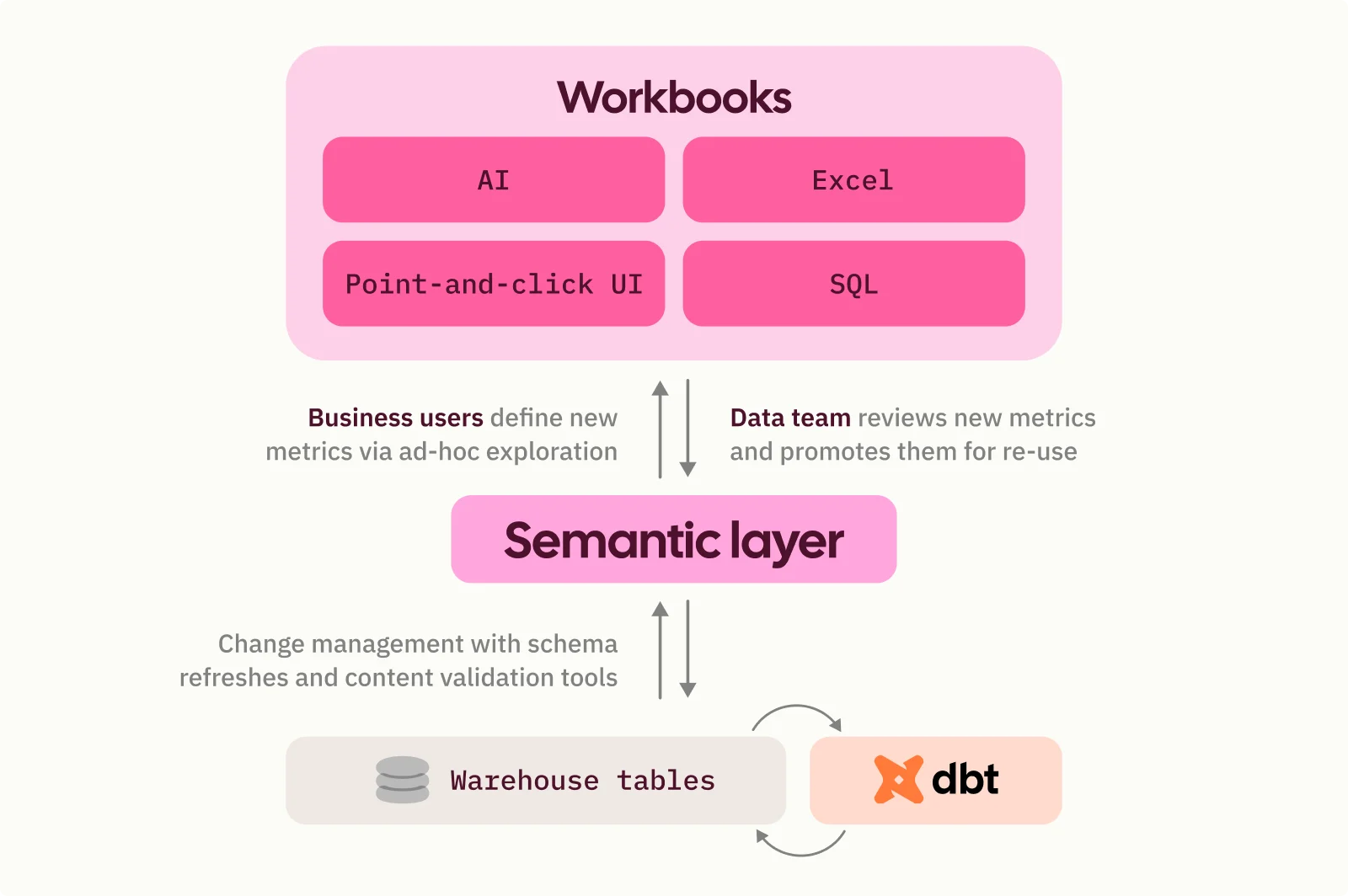
Omni’s semantic layer sits above the warehouse and takes a nuanced approach to provide governance while giving you speed and flexibility. This is made possible by our multi-layered architecture, which references the:
Database: Raw data, Snowflake Semantic Views, dbt models, etc.
Shared data model & model-level AI context: Metrics, definitions, and context relevant to the entire org
Workbook environment: Ad-hoc iterations for specific analyses
Every analysis starts from the same shared semantic model, but offers the flexibility to explore and build your own metrics on top of that model with guardrails in place. Users can build new metrics with a traditional point-and-click workflow, Excel syntax, SQL, or AI (which always builds metrics with the semantic logic rather than raw SQL).
The best use cases for modeling in Omni #
Customers choose to model in Omni because it allows users to easily test new and evolving metrics, a process we call just-in-time data modeling. This is especially useful if you’re diagnosing a fast-changing metric or exploring a new dataset for the first time.
Modeling in Omni also allows you to capture organizational expertise. Because Omni’s model is accessible from the UI, subject matter experts can add new metrics and AI context to teach other humans and agents how to use the metric. This additional context can include field descriptions, synonyms, sample values, sample queries, and unstructured text to capture institutional knowledge that typically lives outside the data stack.
By creating trusted promotion paths for validation, you can build a comprehensive semantic model with context that compounds from everyone’s expertise.
Here’s what this workflow looks like for many of our customers, including Synthesia 👇
Using Snowflake Semantic Views with Omni’s semantic layer #
Regardless of where you model, you can push logic across platforms. Depending on what your team is trying to accomplish, some workflows may make more sense to start in Snowflake or Omni. Here’s how to think about it 👇
For setup details, see our docs on connecting Snowflake Semantic Views.
Hardened metrics that won’t change #
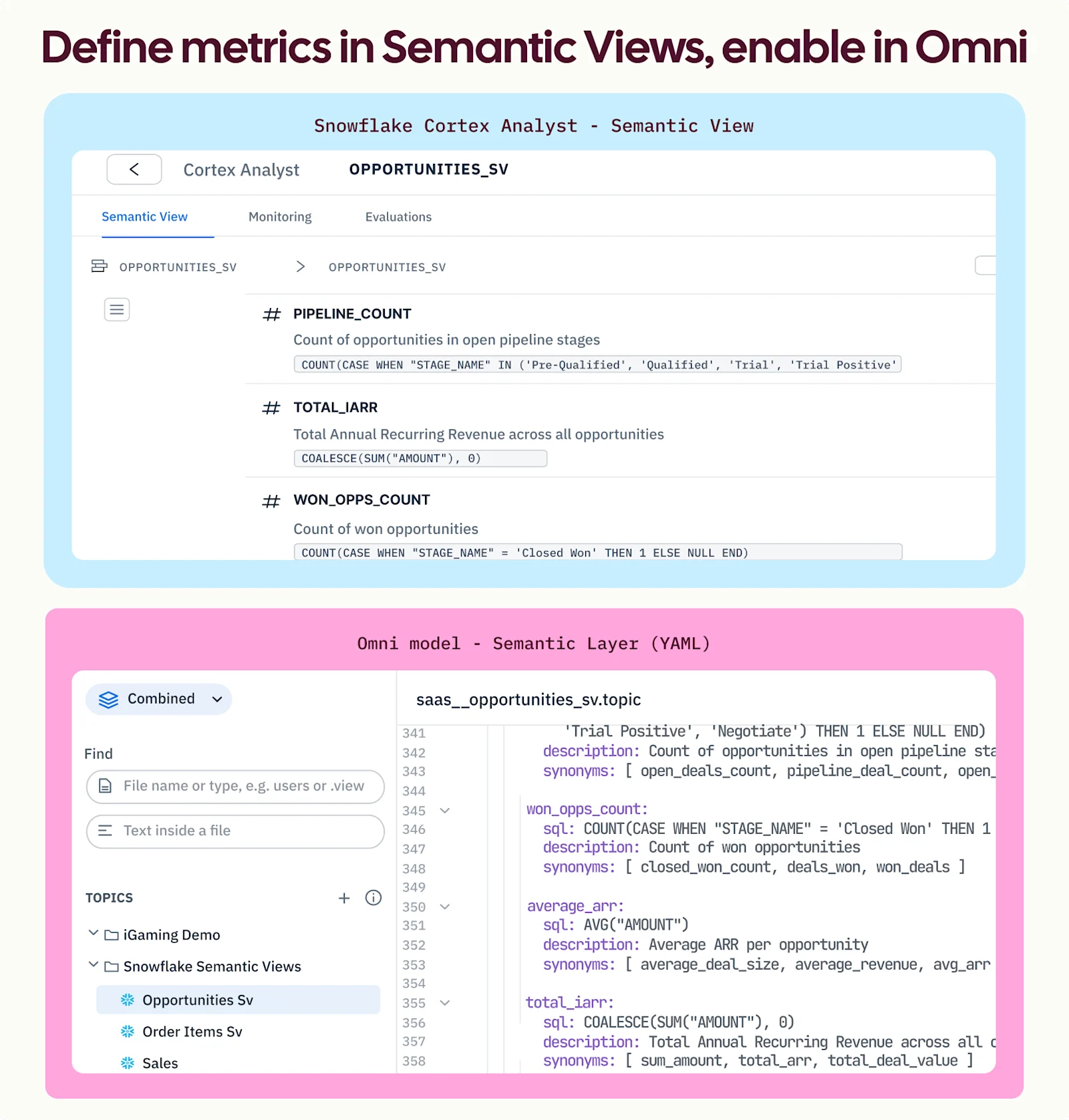
Some metric definitions are set in stone and simply not going to change. For example, a company may track revenue using iARR. That definition is locked.
Because of this, hardening it in the warehouse as a Semantic View makes sense. This means everyone who interacts with iARR via tools on top of Snowflake, including Omni, will follow that same definition.
Even if you’ve already built that definition in Omni, it’s a logical decision to push those critical metrics down as a Snowflake Semantic View. This is important because not all workflows are the same. For example, your data scientists may live in notebooks outside of Omni, and you want to ensure they pull the correct definition of iARR from Snowflake rather than defining it in every cell.
Metrics that evolve with the business #
On the other hand, some metrics are still finding their shape and changing alongside the business. This could be related to a new channel or product feature you want to explore more.
For example, let’s say we’re launching a new AI feature solely in the workbook, and we want to understand user adoption.
First, we may build the metric to track if users are using the feature. After the initial beta, it’s more helpful to update the metric to track how often the new feature is being used. Over time, that feature may change to be present on surfaces outside of the workbook, so we will still want our product team to have full control over the metric.
Since this metric is evolving alongside the feature lifecycle, it’s logical for business users (especially product managers) to update the metric and add context as the feature matures. This is when modeling in the BI layer with Omni’s just-in-time modeling makes sense. Product managers can explore the data and test changes without going through the data team for every iteration.
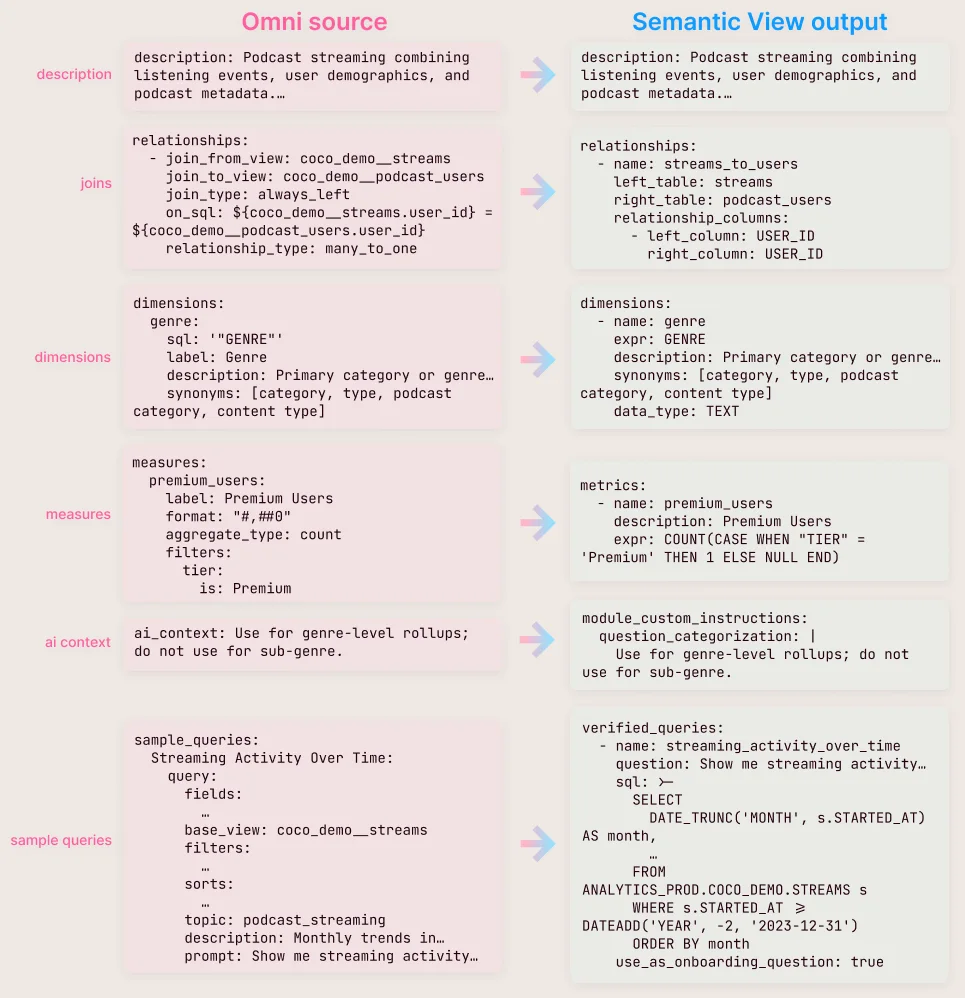
Then if the metric is finalized, it can be pushed back to the warehouse via our omni-to-snowflake-semantic-view skill. This is a one-shot push that takes an Omni Topic (how Omni bundles joins, dimensions, measures, sample queries, and AI context for a given domain) and writes it to Snowflake as a Semantic View.
For a deeper look at the skill, here’s how Omni inputs translate to Snowflake. This allows you to reuse work you’ve done to create not just metrics, but also AI context and sample queries.
Build where you want #
Regardless of the workflow your team prefers, or where you want your metrics to live, we built Omni to provide that interoperability. If your metrics live in the warehouse, we can pull them into Omni to benefit every analysis. And if you’ve modeled in Omni, we can push them back down.
We’re continuing to work closely with the Snowflake team on our integration, and we’re committed to following open-source standards for long-term flexibility.
PS - If you’re using Snowflake + Omni, you might be interested in learning more about our Omni Skills for Snowflake CoCo ❄️