Build analytics like software

Bring your own tools and workflows. Build, test, manage, and deploy on one governed platform.

Free Trial
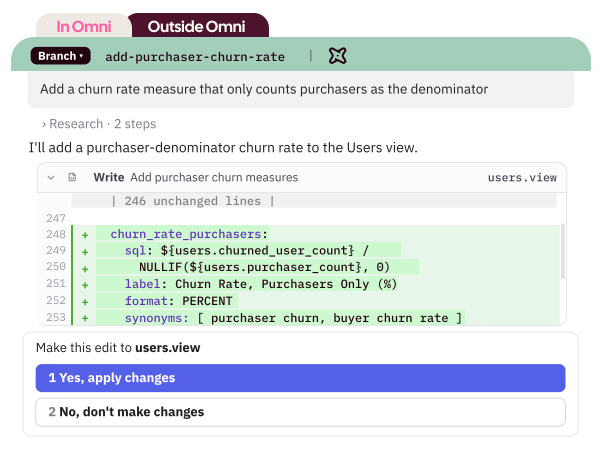
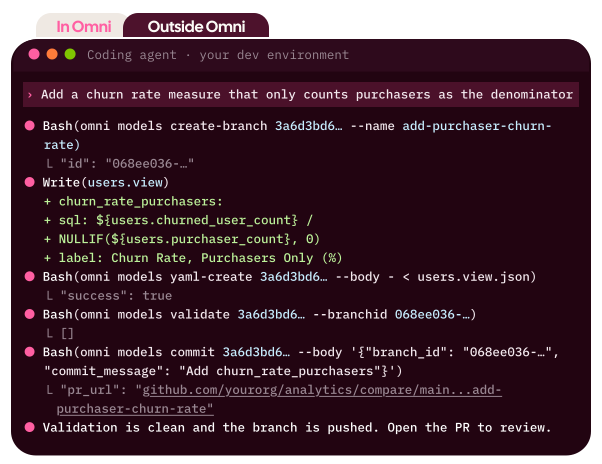
One model change, drafted by the Modeling Agent in Omni on a branch, waiting for reviewThe same model change, drafted by a coding agent with Omni agent skills on the same branch, pushed for review

The developer surface

Tools, agents, and protocols for building and deploying AI analytics.

MCP server

Give external AI agents a governed source of truth.

Git integration

Branching, review, rollback, and version control for the model, dashboards, and apps.

REST API

Automate and bulk manage the whole platform: models, content, users, schedules, and AI.

dbt integration

Transformation and semantic layers stay in bi-directional sync.

CLI

Open-source API wrapper that’s human- and agent-friendly. Single commands run multi-call workflows for simpler exploration and scripting.

AI Hub

Observe usage and set credit controls. Suggestions turn real usage into model fixes, and Evals test your agent before changes ship.

Embedded analytics

Deploy Omni in your application with per-tenant permissions and SSO.

Setup is easy

Agents

Connect MCP

Add your instance's MCP server in Claude, ChatGPT, or Cursor

Editor

Install the agent skills

/plugin marketplace add exploreomni/omni-agent-skills

Terminal

Install the CLI

curl -fsSL https://raw.githubusercontent.com/exploreomni/cli/main/install.sh | sh

Common workflows

In Omni or your coding agent, branch the model, fix validation errors, and open a PR.Model IDECLIAgent skillsGit

Handle upstream changes automatically. Run validation on pull requests, and refresh the schema on merge.CLIGitdbtREST API

List users, update roles, modify permissions, and more from the terminal, a coding agent, or a script.REST APICLI

Pull governed data into notebooks, pipelines, and your own apps through the MCP server, CLI, and API.MCP serverCLIREST APIomniframes

Build interactive data applications and AI chat for your customers, white-labeled and configured with ease on Omni's infrastructure.EmbedREST API

Changelog
Nov 16AIFixed an issue where large eval runs on paid LLM providers could start many jobs at once and exceed provider rate limitsNov 16MCPOmni's MCP server can now delete and update labelsNov 16AIApps can now read AI eval prompt sets and run results through the omni.api bridge, for example to power an AI Hub-style appNov 16APIThe Get a branch API now includes a redacted field on content draftsNov 16APIAdded a detailed timing breakdown to AI eval run resultsNov 16APIAdded an API endpoint to add a data input table to a draft from rowsNov 16APIAdded an API endpoint to create an input column on a queryNov 16APIYou can now create, delete, and merge branches directly through the APINov 16IntegrationsDatabricks connections using OAuth M2M now request the narrower sql scope instead of all-apisNov 9AIEval runs can now opt into LLM routing, so they measure what a customer with routing on would getNov 9AIYou can now turn off backup-LLM fallback for manual eval runsNov 9AIEval runs now show Coverage and Success lower bound alongside Accuracy, on the runs list, run page, and run comparisonNov 9APIYou can now set or clear a CSV's key with the Upload a CSV file and Replace upload data endpointsNov 16AIFixed an issue where large eval runs on paid LLM providers could start many jobs at once and exceed provider rate limitsNov 16MCPOmni's MCP server can now delete and update labelsNov 16AIApps can now read AI eval prompt sets and run results through the omni.api bridge, for example to power an AI Hub-style appNov 16APIThe Get a branch API now includes a redacted field on content draftsNov 16APIAdded a detailed timing breakdown to AI eval run resultsNov 16APIAdded an API endpoint to add a data input table to a draft from rowsNov 16APIAdded an API endpoint to create an input column on a queryNov 16APIYou can now create, delete, and merge branches directly through the APINov 16IntegrationsDatabricks connections using OAuth M2M now request the narrower sql scope instead of all-apisNov 9AIEval runs can now opt into LLM routing, so they measure what a customer with routing on would getNov 9AIYou can now turn off backup-LLM fallback for manual eval runsNov 9AIEval runs now show Coverage and Success lower bound alongside Accuracy, on the runs list, run page, and run comparisonNov 9APIYou can now set or clear a CSV's key with the Upload a CSV file and Replace upload data endpoints